AI Tools
Vidsembly Review: Turn PowerPoint Slides, PDFs and Documents Into Narrated AI Videos
Vidsembly review: turn PowerPoint slides, PDFs and documents into narrated videos with AI voices or your own voice clone, then host and share them.
CodeHype10 min read
Plenty of useful knowledge already lives in slide decks, PDFs and documents: onboarding material, product training, course lessons, sales pitches. Turning that material into video usually means recording yourself presenting, editing the result on a timeline and finding somewhere to host it. For many teams, that work is the reason a deck never becomes a video.
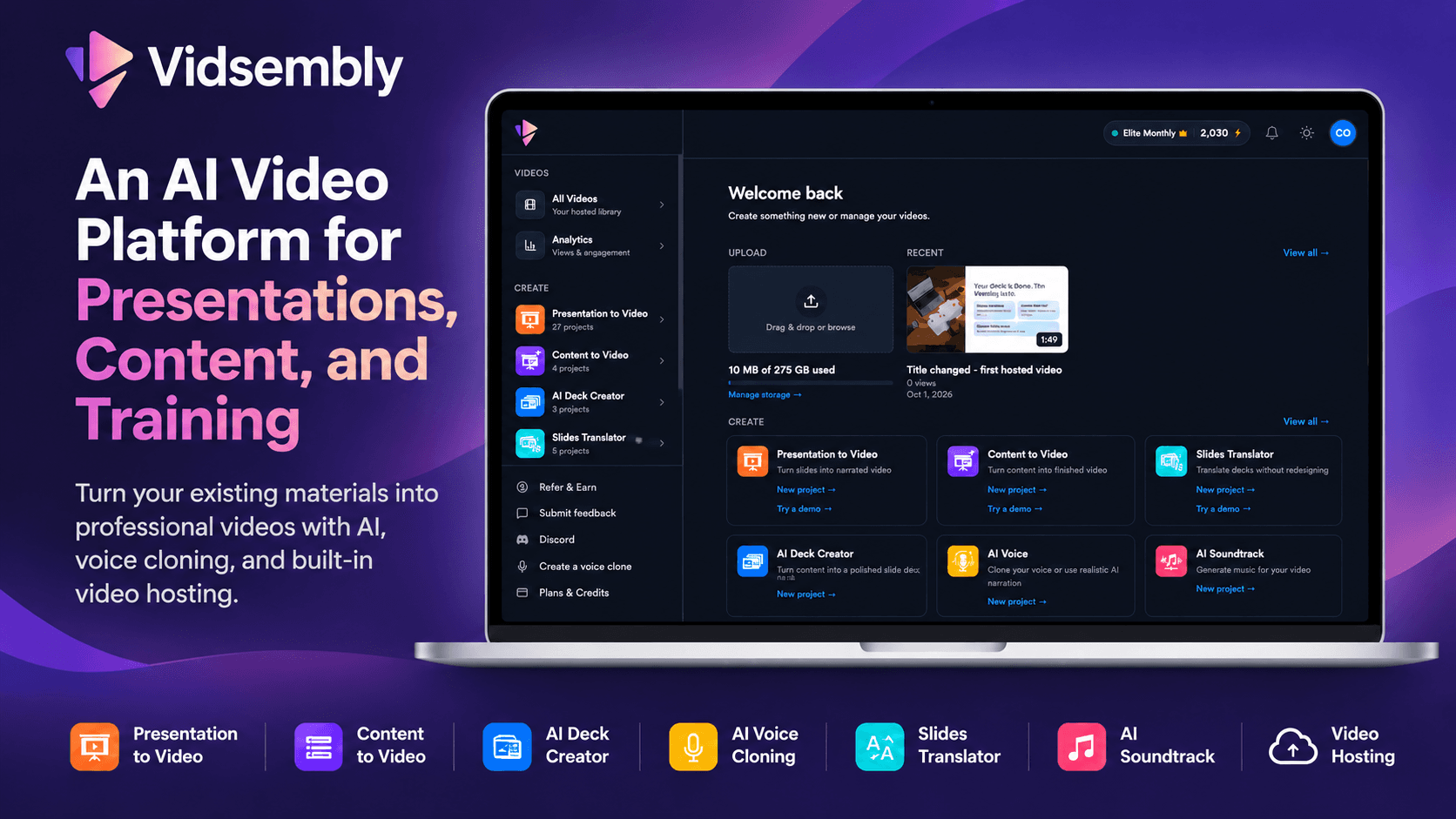
Vidsembly is an AI video platform built to shorten that process. You upload a PowerPoint or PDF, Vidsembly writes or imports narration for each slide, voices it with an AI voice or a clone of your own voice and exports a narrated MP4, with no timeline editing. It also creates decks from documents, translates slides, transcribes audio, generates background music and hosts finished videos. You can explore every tool on Vidsembly's official website.
This review covers each Vidsembly tool, how the PowerPoint to video workflow works, what the plans cost, and where the platform fits best.
What Is Vidsembly?
Vidsembly is a web-based platform for turning existing materials into narrated videos, transcripts and presentations. It's aimed at people who explain things for a living: training and L&D teams, educators, sales enablement teams, internal communications, founders and consultants.
Instead of one large editor, Vidsembly is organized as a set of focused tools that share one account, one credit balance and one video library. It's listed on CodeHype in the AI category, and the Vidsembly product listing has the maker's own summary.
Key Features of Vidsembly
Presentation to Video
This is Vidsembly's core tool. You upload a PPTX, PPT or PDF file, and Vidsembly turns it into a narrated MP4.
- Narration from speaker notes or AI: it can import your speaker notes, or write a script for each slide with AI. Either way, you can edit the script before rendering.
- Choice of voice: narrate with a voice from the library or with your own voice clone.
- Translation: the script can be translated into another supported language.
- Easy revisions: if something isn't right, regenerate the video with a different voice or an edited script.
Content to Video
If you don't have a deck yet, Content to Video starts from written material. You upload a DOCX, PDF, TXT or Markdown file, or paste text, and Vidsembly generates a slide deck and narration from it. The result is a narrated MP4 plus an editable PPTX, so you can keep working on the slides in PowerPoint.
AI Deck Creator
The AI Deck Creator is Vidsembly's AI presentation maker. It builds an editable deck from notes, a DOCX or a PDF, or you can start from a blank deck. Decks export as PPTX or PDF.
AI Voice and Voice Cloning
The AI Voice tool turns a script into a voiceover clip using library voices or a voice clone. Cloning lets you narrate future videos in your own voice without recording each one. Vidsembly states that you need someone's explicit consent before cloning their voice.
Slides Translator
The Slides Translator translates PPTX, PPT or PDF decks while keeping the original layout. You can regenerate individual slides, export the translated deck as a PDF and send it straight to Presentation to Video. Vidsembly notes that it works best with 16:9 decks and that custom fonts may need a second pass.
Transcriber
The Transcriber converts MP3, MP4, WAV and M4A files into text, with optional timestamps. It auto-detects more than 100 languages, and transcripts export as TXT, DOCX, SRT or PDF. Speaker detection is available on the Pro and Elite plans.
AI Soundtrack
AI Soundtrack creates original instrumental music fitted to the length of your video. You pick one of six moods (Cinematic, Corporate, Upbeat, Ambient, Lo-fi or Dramatic) or write your own prompt. The track can be mixed into your MP4, and Pro and Elite users can also download it on its own as an MP3. The music can't be resold or uploaded to streaming services as a standalone track.
Video Hosting and Analytics
Finished videos don't need a separate host. Vidsembly gives each video a permanent watch link and embed code, and you can make it unlisted (anyone with the link) or private to your account. You can set a custom thumbnail, control downloads and replace a video without changing its link, which is useful when training content needs updating.
All plans show view counts. Pro and Elite add watch time, average watched, traffic sources and views over time.
Supported Languages
Vidsembly produces narration in 12 languages: English, Spanish, Chinese, Hindi, German, Italian, Arabic, French, Dutch, Japanese, Korean and Portuguese. English is available in US, UK, Australian and Indian dialects.
How Vidsembly Works
The PowerPoint to video workflow takes four steps:
- Upload a PPTX or PDF of your presentation.
- Add narration by importing your speaker notes or generating a script for each slide, then edit it.
- Choose a voice from the library or your own clone, and preview it.
- Preview and download the MP4, or regenerate with a different voice or script.
You can also try the Presentation to Video tool without an account. The no-account trial allows 3 projects a day, up to 15 slides and 50 MB per file. Those exports are watermarked, and files are deleted after 24 hours.
Use Cases
Employee Onboarding and Compliance Training
Training teams can turn existing onboarding and compliance decks into narrated videos, host them with private or unlisted links and see who is watching through the analytics. When a policy changes, the video can be replaced without breaking the link that's already shared in your LMS or handbook.
Education and Online Courses
Teachers and course creators can convert lecture slides into narrated lessons in their own cloned voice, add a soundtrack and translate the lessons for students in other languages. If you're looking for other ways to make training more engaging, our review of Ludiz and gamified training covers a different approach.
Sales Enablement and Product Marketing
Sales and marketing teams can turn pitch decks and product one-pagers into short explainer videos, share them by link and check viewing data before a follow-up call.
Internal Communications
Leadership updates and all-hands slides can become short narrated videos that people watch in their own time, with transcripts for anyone who prefers to read.
Multilingual Teams
The Slides Translator, translated scripts and 12 narration languages let you publish the same material in several languages without rebuilding each deck by hand.
Vidsembly Pricing
Vidsembly uses a credit system across all its tools. Prices are shown in dollars.
| Plan | Monthly | Yearly | Credits | Video storage | Voice clones |
|---|---|---|---|---|---|
| Free | $0 | $0 | 30 one-time | 50 MB | See note below |
| Pro | $6.99 | $69.99 | 300 per month | 50 GB | 3 |
| Elite | $21.99 | $219.99 | 1,200 per month | 250 GB | 5 |
What each plan includes:
- Free: standard library voices, exports at the original resolution of your slides, and a watermark on exported videos.
- Pro: premium voices, no watermark, 720p and 1080p re-render options and top-up credits.
- Elite: everything in Pro, plus 4K re-render export and priority render speed. Priority rendering is marked as coming soon.
Some details to be aware of:
- Free credits: Vidsembly says the first 10,000 signups receive 30 free credits and later signups receive 20.
- Voice cloning on Free: at the time of writing, a promotion gives free accounts one voice clone through the end of November 2026. Otherwise, voice cloning is a paid-plan feature.
- Credit costs: the Slides Translator uses 3 credits per slide, AI Soundtrack uses 1 credit per minute and AI Voice is billed by audio length. Vidsembly doesn't publish a per-minute credit cost for videos on its pricing section.
- Refunds: according to its terms, payments are final except for billing errors or where the law requires otherwise.
Check the pricing section of Vidsembly's website for the latest plans before you subscribe.
Who Should Use Vidsembly?
Vidsembly is a good fit for:
- L&D and HR teams with a library of training decks to turn into video.
- Educators and course creators who want narrated lessons without recording every take.
- Sales and marketing teams who need quick explainer videos from existing decks.
- Small teams and solo founders who want creation, hosting and analytics in one low-cost tool.
It's not designed to replace a full video editor. If you need detailed timeline editing, motion graphics or camera footage editing, you'll want a traditional editor alongside it. For AI video generation from prompts rather than slides, see our review of Cliptude's AI video generator.
Advantages and Limitations
Advantages
- Uses the material you already have: PowerPoint, PDF, Word and text files.
- No timeline editing for slide-based videos.
- Your own voice through voice cloning on paid plans.
- Many tools in one place: decks, translation, transcription, music and hosting share one credit balance.
- Built-in hosting with private or unlisted links, embeds, replaceable videos and analytics.
- Low entry price, with a free plan and Pro at $6.99 a month.
Limitations
- Free exports are watermarked, and the free credits are a one-time allowance.
- Credit costs per video aren't published, which makes it harder to estimate monthly usage in advance.
- Some Elite features are still coming soon, such as priority rendering.
- Not a full video editor, so complex edits need another tool.
- The Slides Translator works best with 16:9 decks, and custom fonts may need a second pass.
- Payments are generally non-refundable except for billing errors or where required by law.
Final Verdict: Is Vidsembly Worth It?
Vidsembly makes a convincing case for turning existing decks and documents into video. The PowerPoint to video tool is straightforward: upload, narrate, choose a voice and download. The extra tools for decks, translation, transcription, music and hosting cover most of what a training or education team needs around it. Pricing is low, and the free plan and no-account trial make it easy to test with one of your own decks before paying.
Its credit costs could be clearer, and it isn't meant for heavy editing, but for slide-based explainer and training videos it saves a lot of time. Visit the official Vidsembly website to try it with one of your presentations.
Frequently Asked Questions
Can Vidsembly convert PowerPoint to video with narration?
Yes. Upload a PPTX, PPT or PDF, import your speaker notes or let AI write a script for each slide, choose a voice and download a narrated MP4.
Does Vidsembly have a free plan?
Yes. The free plan includes one-time credits, standard voices, 50 MB of video storage and watermarked exports. You can also try the Presentation to Video tool without an account.
Can I use my own voice in Vidsembly?
Yes. Vidsembly can clone your voice so it narrates your videos. Pro includes 3 voice clones and Elite includes 5. At the time of writing, free accounts also get one clone through the end of November 2026.
Can Vidsembly turn a PDF or Word document into a video?
Yes. Presentation to Video accepts PDFs, and Content to Video turns DOCX, PDF, TXT or Markdown files, or pasted text, into a narrated video plus an editable PPTX.
Which languages does Vidsembly support?
Narration is available in 12 languages, including English, Spanish, French, German, Chinese, Hindi, Arabic, Japanese and Korean. The Transcriber auto-detects more than 100 languages.
Can I host and share videos with Vidsembly?
Yes. Each video gets a permanent watch link and embed code, with unlisted or private sharing, custom thumbnails and view analytics.