Education
Ludiz Review: An AI Gamification Platform for Training Games, Escape Games and Live Quizzes
Ludiz review: build escape games, point & click scenes and live quizzes for training and onboarding with AI, then share by link, QR code or SCORM.
CodeHype9 min read
Most corporate training has the same problem: people click through the slides without remembering much. Games help, because they make people take part. But building a good escape game or interactive quiz usually takes an agency, a long brief and a big budget.
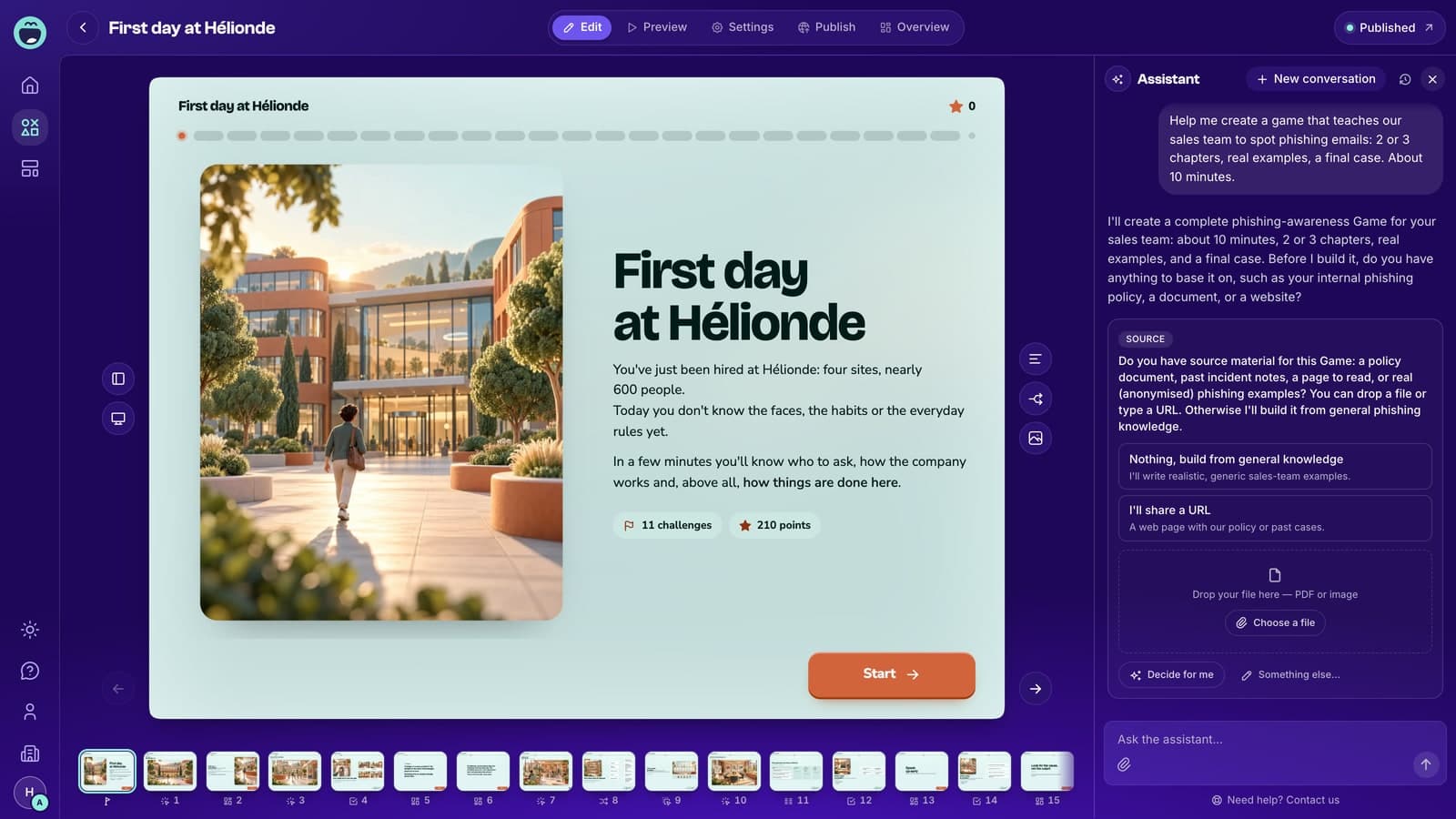
Ludiz is a no-code gamification platform that changes that. You describe the game you want in a sentence, or give it a PDF or your website's address, and its AI assistant builds a complete game with screens, mechanics, images and a theme. You can make self-paced games such as escape games and point & click scenes, or live games that a whole room plays from their phones. Explore the platform on Ludiz's official website.
This review explains what Ludiz builds, how the AI assistant works, how games are shared, what the plans cost and who it's best for.
What Is Ludiz?
Ludiz builds company games for training, onboarding, safety, awareness, marketing and events. It offers two ways to work:
- Build it yourself with AI in the Ludiz editor
- Have the Ludiz studio build it, for bespoke projects such as multi-site challenges, multilingual programs and event activations
The platform suits learning and development teams, HR, trainers, internal communications teams and event organizers who want engaging content without writing code. Ludiz is listed in the Education category on CodeHype, and you can see its Ludiz product listing.
Key Features of Ludiz
An AI Assistant That Builds the Whole Game
The AI assistant is the starting point. You can give it:
- A sentence describing your idea, for example a short game that teaches a sales team to spot phishing emails
- A PDF, such as a policy document or training material
- Your website's address, from which it picks up your branding
From there, the assistant generates the screens, mechanics, images and theme together. It asks for missing information, such as whether you have source material, and it can play-test the game and fix issues when you ask. Every screen stays editable, either by hand or through the assistant.
Two Kinds of Games: Self-Paced and Live
Self-paced games are played by each person on their own time. Examples include onboarding paths, escape games, point & click scenes, branching choices, quizzes and e-learning courses.
Live games are projected in a room, on a video call or at an event stand. Players join from their phones with a code, with no app to install. Live games include questions, polls, word clouds, a live leaderboard and a podium, which makes Ludiz a possible Kahoot alternative for meetings, training sessions and events.
22 Game Mechanics Plus Screens and Paths
Ludiz includes 22 game mechanics and 6 screen and path types. The mechanics include:
- Multiple choice, true or false, open questions and fill in the blanks
- Swipe cards, flash cards, memory and card match
- Put in order, categorize, timeline and priority matrix
- Puzzle, lock and knob to turn, which suit escape games
- Point & click, object to search and point zones
- Drag & drop, connect, slider and geolocation
The screen and path types include content screens, chapters, step choices, conditions, forms and pair choices, so you can build branching scenarios and multi-chapter journeys. According to Ludiz, the AI assistant can build with most of these, apart from a few such as the priority matrix, geolocation and forms.
Flexible Sharing, Including SCORM
Self-paced games can be shared by:
- Link
- QR code
- Embed on your website
- SCORM package for your LMS, with export to SCORM 1.2, SCORM 2004 3rd Edition and SCORM 2004 4th Edition
Games are responsive and playable on desktop, tablet and smartphone, and the editor preview shows how the layout looks on each screen size.
Branding, Collaboration and Roles
Paid plans let you customize your creation space and public game library with your logo and colors. Team plans let collaborators create and edit together, and the back office has administrator, editor and player roles. The largest plans add a personalized URL and white-label operation.
Results and Statistics
Ludiz offers statistical reports, a leaderboard and player-by-player results. Basic statistics come with the Creator plan, and advanced statistics with Pro and above.
Hosting and Security
The Ludiz FAQ says data is stored with Supabase on AWS in Frankfurt, with file hosting on Vercel in AWS Paris. Players can sign in anonymously, with email and password, with Google or with an email login link. Email or phone collection is optional and comes with a consent box. MFA and SSO are available on paid offers. Ludiz also states openly that it hasn't carried out a penetration test yet.
How Ludiz Works
- Sign up for free in the Ludiz editor. No credit card is needed.
- Describe your game to the AI assistant, or import a PDF or your website.
- Answer the assistant's questions about content, length and audience.
- Review and edit the generated chapters, screens, questions and illustrations.
- Test the game in the preview on desktop, tablet and phone sizes.
- Publish with a paid plan or a one-off publication, then share by link, QR code, embed or SCORM, or project it as a live game.
- Track results with statistics and the leaderboard.
Use Cases for Ludiz
Employee Onboarding
Turn a welcome booklet into a self-paced game that introduces new hires to sites, people and processes.
Compliance, Safety and Security Awareness
Build escape games or point & click scenes around phishing, workplace safety or company policies, so people practice spotting problems instead of just reading about them.
Live Training Sessions and Meetings
Run a live quiz with polls and word clouds, then end with a leaderboard and podium to keep a session interactive.
Events and Trade Shows
Project a live game on a stand or at a company event, with players joining from their phones.
Bespoke Programs for Large Organizations
For multi-site challenges, multilingual programs or hybrid physical and digital games, the Ludiz studio designs and runs custom projects.
Ludiz Pricing
Ludiz is free to start, with no credit card and no time limit. Prices on the official pricing page include VAT.
| Plan | Price | AI games per month | Players per game |
|---|---|---|---|
| Free | €0 | 1 in total | Testing only, no publishing |
| Pay as you go | €29 or €299 per game, one-time | Not applicable | 500 or 5,000 |
| Creator | €9/month or €90/year | 2 | 50 |
| Pro | €29/month or €290/year | 6 | 500 |
| Team | €890/year | 20 | 2,000 |
| Toolbox | €1,290/year plus €6 per published game | Unlimited | 5,000 |
| Large accounts | On quote | Unlimited | On quote |
Some points to note:
- The free plan can't publish. You can build and test games with every mechanic, but sharing needs a paid plan or a pay-as-you-go publication.
- Publications per month match the AI game allowance on Creator (2), Pro (6) and Team (20).
- SCORM export comes with Team, Toolbox and the €299 pay-as-you-go tier.
- Extra players on Creator, Pro and Team cost €0.12 each if extra billing is enabled. Otherwise new players are blocked when the quota is reached, while the game stays online.
- Yearly billing gives two months free, and plans can be canceled at any time.
Check the official pricing page for the full comparison, including workspaces, collaborators and video limits.
Who Should Use Ludiz?
Ludiz is a good fit for:
- L&D teams and trainers who want interactive training without a development team
- HR teams building onboarding journeys
- Security and compliance teams running awareness campaigns
- Event and marketing teams that want live games for audiences
- Large organizations that want a studio to build bespoke games
Advantages and Limitations
Advantages
- Fast creation. The AI assistant builds a full game from a sentence, a PDF or a website.
- A wide range of mechanics, from simple quizzes to escape-game puzzles and point & click scenes.
- Self-paced and live games on one platform.
- LMS-friendly SCORM export in three versions.
- No app for players, who join live games from their phones.
- Low entry price, starting at €9 per month, with a free plan for building and testing.
Limitations
- No publishing on the free plan. You need to pay to share a game.
- Player caps on each plan, with overage charges or blocked players beyond the quota.
- SCORM isn't on the cheaper plans.
- No penetration test yet, which some enterprise security reviews may ask about.
Final Verdict: Is Ludiz Worth It?
Ludiz makes game-based learning practical for teams that don't have the time or budget for custom development. The AI assistant removes most of the blank-page work, the range of mechanics covers far more than multiple-choice quizzes, and supporting both self-paced and live games means one tool can cover onboarding, compliance training and events.
The free plan is for building and testing only, so plan for at least the Creator plan or a single pay-as-you-go publication when you're ready to share. If you want training that people actually take part in, Ludiz is worth trying. Visit the official Ludiz website to build your first game for free.
Frequently Asked Questions
What is Ludiz used for?
Ludiz is used to build company games for training, onboarding, safety, awareness, marketing and events. It supports self-paced games, such as escape games and point & click, and live games played from phones.
Can I create a game with AI in Ludiz?
Yes. Describe your idea in a sentence, or give the assistant a PDF or your website's address, and it builds the screens, mechanics, images and theme. Every screen stays editable.
Is Ludiz free?
You can build and test games for free with no credit card and no time limit. Publishing requires a paid plan, starting at €9 per month, or a one-off pay-as-you-go publication from €29.
Does Ludiz support SCORM?
Yes. Ludiz can export SCORM 1.2, SCORM 2004 3rd Edition and SCORM 2004 4th Edition packages. SCORM export is included with the Team and Toolbox plans and the €299 pay-as-you-go tier.
Do players need to install an app for live games?
No. Players join live games from their phones with a code, without installing an app.
Can Ludiz be used as a Kahoot alternative?
Its live games include questions, polls, word clouds, a live leaderboard and a podium, so it covers the same live-quiz use case. It also adds self-paced escape games and point & click scenes.