AI Tools
Cliptude: An AI Video Generator for Faceless YouTube Channels
Discover how Cliptude turns prompts and scripts into faceless YouTube videos with AI voiceovers, real footage, animated maps, charts, captions, and editing tools.
CodeHype17 min read
Creating high-quality YouTube videos involves much more than recording a voiceover or writing a script. Creators need to research topics, organize scenes, source relevant footage, create animations, add captions, synchronize audio, and edit everything into a finished video. For creators running faceless YouTube channels, these tasks can take hours or even days for a single upload.
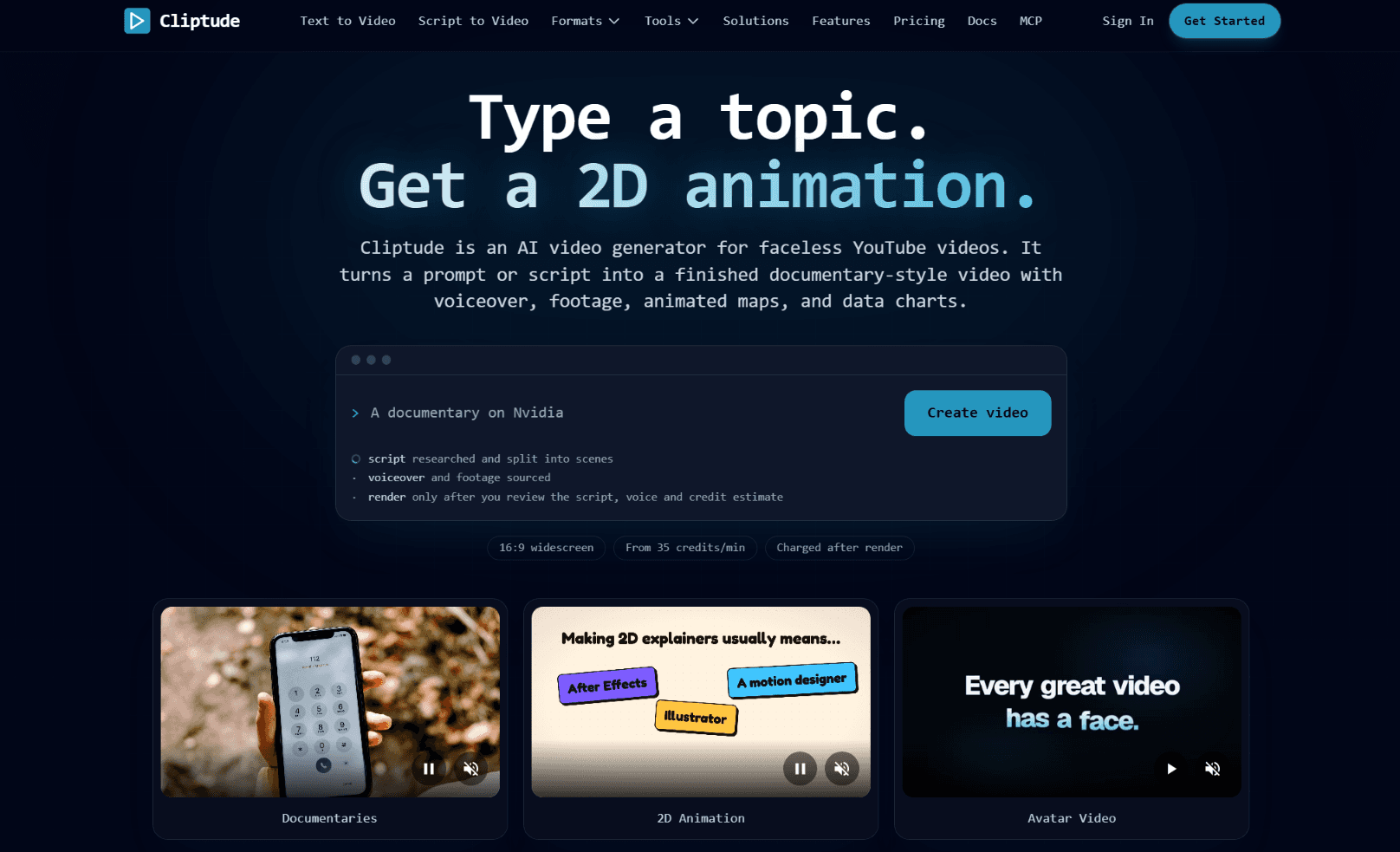
Cliptude aims to simplify this process with an AI-powered video generation workflow. It turns a topic prompt or an existing script into a documentary-style video with narration, footage, animated maps, data charts, and other visual elements. Instead of assembling every component manually, creators can review a proposed script, voice, style, and credit estimate before rendering the video.
The platform is designed for creators who want to publish long-form YouTube content without appearing on camera. It also supports documentary channels, Top 10 videos, explainers, 2D animations, and AI avatar videos.
With Cliptude, creators can move from an initial idea to a finished video while retaining the ability to review the plan and refine the final edit.
What Is Cliptude?
Cliptude is an AI video generator built primarily for faceless YouTube content. It combines research, script generation, voiceovers, visual sourcing, motion graphics, captions, and video editing into one workflow.
Rather than requiring creators to work across several applications, Cliptude coordinates many of these steps around a single topic or script. Users can enter a topic, paste a completed script, or upload their own voiceover, then choose a video format.
The platform can create documentary videos using real footage, generate maps and charts from script data, and produce illustrated scenes for 2D animation formats. It also offers AI avatar videos with a lip-synced presenter.
Cliptude focuses on landscape videos for traditional YouTube publishing, with a stated export resolution of 1920 × 1080. This makes it particularly relevant to creators producing long-form videos rather than content designed primarily for vertical short-form platforms.
The platform reports more than 7,500 creators signed up and over 1,900 videos rendered. These figures are presented by Cliptude and provide an indication of its existing creator community, although they do not guarantee individual results.
Why Use an AI Video Generator for Faceless YouTube?
Faceless YouTube channels allow creators to publish content without appearing on camera. They can focus on storytelling, education, documentaries, commentary, rankings, or other topics using narration and visuals.
However, producing this type of content still requires significant effort.
Researching and writing scripts
A good video begins with a clear topic and a script that keeps viewers interested. Creators need to organize information into a coherent narrative and divide it into scenes that can be illustrated effectively.
Cliptude can research a topic and generate a script from a prompt. Creators who already have a script can also use their own material instead of starting from scratch.
Finding relevant footage
Documentaries and explainer videos often depend on footage that matches the narration. Searching for suitable clips, checking their relevance, and cutting them to fit the voiceover can be time-consuming.
Cliptude sources and edits footage for supported formats. Its workflow can use online clips, licensed stock footage, and public-domain material, depending on the visual requirements.
Producing graphics and animations
Some stories need more than conventional video clips. Geography, statistics, historical events, rankings, and processes may be easier to understand through maps, timelines, counters, or illustrated scenes.
Cliptude can generate data visualizations, including maps and timelines, from information in the script. Its 2D animation format provides another option for creators who prefer illustrated visuals.
Recording and synchronizing narration
Recording a voiceover requires suitable equipment, a quiet environment, and editing time. Hiring a narrator can add further costs.
Cliptude offers AI voices with pacing, pauses, and intonation designed for storytelling. Creators can preview available voices before committing to a render, and the platform also supports bringing in a custom voice clone through an ElevenLabs Voice ID.
Editing and exporting the finished video
After gathering the assets, creators still need to arrange scenes, synchronize audio, add captions, and export the final video.
Cliptude combines these tasks in a video workflow with a timeline editor. Users can download the finished MP4 and access project files and separate media assets for further editing in supported professional video editors.
Key Features of Cliptude
1. Turn a Prompt Into a Finished Video
Cliptude's central feature is its ability to turn a topic into a complete video workflow.
A creator can enter a subject, after which the platform prepares a researched script and divides it into scenes. It then works on narration, footage, and visual elements to create a video aligned with the planned story.
This approach is useful for creators who have ideas but lack the time or editing experience to produce every video manually.
For example, someone creating an educational channel could begin with a topic about the history of an invention. Cliptude can prepare the script and organize the visuals around the narration, including relevant footage and graphics where appropriate.
The process is designed to reduce the distance between having an idea and preparing a publishable video.
2. Script-to-Video Generation
Not every creator wants AI to write the entire script. Some already have researched material, original narration, or a complete video outline.
Cliptude supports script-to-video workflows, allowing users to paste their own script and use the platform for the remaining production steps.
This flexibility is valuable for educators, writers, researchers, and creators who want to maintain control over their storytelling while reducing the manual work involved in editing.
Users can also upload a voiceover and use the rest of the pipeline to source footage, add graphics and captions, and prepare the export.
The platform therefore supports both ends of the process: generating content from an idea and turning existing creative work into a finished video.
3. Faceless Documentary Videos
Documentary-style videos are a key use case for Cliptude.
These videos combine narration with footage, maps, and data charts to explain a subject without requiring an on-camera host. Cliptude's documentary format is designed to coordinate these elements around the script.
Creators can use this approach for educational content, historical topics, business stories, science explainers, and other subjects that benefit from a narrated visual presentation.
The platform lists two documentary rendering options, Cinder and Caldera, with estimated consumption of 40 to 55 credits per finished minute depending on the model.
Because documentary quality depends heavily on research and visual relevance, creators should still review the script and final timeline before publishing. Automated production can save time, but editorial judgment remains important for factual accuracy and storytelling.
4. AI-Powered Top 10 Videos
Ranked-list videos are another format supported by Cliptude.
The platform can create Top 10 videos structured around a countdown, with narration and footage arranged to match the ranked list. This format can work for channels covering technology, travel, entertainment, historical facts, educational topics, and product comparisons.
Instead of manually searching for visuals for every entry, creators can use Cliptude's production workflow to assemble the video around the script.
The result is intended to make list-based content easier to produce consistently.
Creators should take care to verify rankings, sources, and factual claims before publication. A well-produced video still needs accurate information and a clear reason for viewers to watch.
5. AI Voiceovers and Custom Voice Options
Narration is central to faceless video production. A voiceover helps communicate the story, establishes the tone, and guides viewers through the visuals.
Cliptude provides more than 21 AI voices across styles such as news, storytelling, energetic delivery, and calm narration. Users can preview voices before choosing one for a video.
The platform emphasizes pacing, pauses, and emphasis to make narration sound more natural than basic text-to-speech output.
Creators can also use a custom voice clone through an ElevenLabs Voice ID, subject to the relevant service requirements and permissions.
These options allow channels to select a voice that matches their content style. A documentary about historical events may benefit from a measured narrative tone, while a fast-paced ranking video may need more energetic delivery.
6. Automated Maps, Charts, and Data Visualizations
Some topics are difficult to explain using stock footage alone. A video about migration patterns, flight routes, historical timelines, or numerical comparisons may need custom graphics to make the information clear.
Cliptude can generate visual elements such as animated maps, flight paths, timelines, and counters based on the script's data.
This reduces the need to create each graphic manually in a separate animation application.
For creators producing documentaries, educational videos, and data-driven explainers, these visual elements can make complicated information easier to follow.
As with other AI-generated elements, creators should check that graphics accurately represent the underlying information. Incorrect labels or misleading visual comparisons can undermine an otherwise well-produced video.
7. Multiple Video Formats
Cliptude offers four main video formats, giving creators different ways to present their content.
- Faceless Documentary: Combines narration, real footage, maps, and charts for long-form storytelling.
- Faceless Top 10: Creates ranked-list videos with footage matched to the narration.
- 2D Animation: Uses illustrated vector scenes that can remain static or be animated.
- Avatar Video: Includes a lip-synced AI presenter with generated scenes, or a short avatar introduction followed by other visuals.
The formats have different credit requirements. Standard formats generally use the model's rate, while fully animated video scenes can consume substantially more credits than static illustrations.
Choosing the right format depends on the subject, audience, and production goals. A documentary may need authentic footage and maps, while an explainer about an abstract concept may be better suited to illustrated scenes.
8. Review Before Rendering
One useful aspect of Cliptude's workflow is that rendering does not begin immediately after entering a prompt.
Users can review the script, voice, style, and estimated credit consumption before approving the render. They can make changes or stop the process before the video is generated.
This review stage gives creators a chance to catch problems before spending credits on a completed video.
It can also help ensure that the selected style matches the channel's identity and that the script follows the intended direction.
For creators managing a production budget, reviewing the estimated cost before rendering is particularly helpful.
9. Timeline Editing and Professional Exports
AI-generated videos do not always need to be published exactly as they are produced. Some creators may want to adjust scene timing, refine transitions, change footage, or make additional edits.
Cliptude provides a timeline editor for polishing videos after generation. Users can also download the final MP4 and a project ZIP containing an FCP 7 XML timeline and raw media assets.
The export workflow supports DaVinci Resolve, Adobe Premiere Pro, and Final Cut Pro.
Cliptude also provides separate audio tracks, video assets, and SRT subtitle files. This gives creators more flexibility when preparing the final version for publication or making future revisions.
These editing and export options are useful for creators who want AI to handle the first cut while keeping control over the final production.
10. Captions, Titles, and Thumbnail Options
Packaging is an important part of publishing a YouTube video. Viewers need a clear title, readable captions, and a thumbnail that communicates what the video is about.
Cliptude supports burned-in captions with 21 styles, including karaoke, outline, and documentary looks. Captions are timed to the voiceover and can be edited in the timeline.
The platform also provides title and thumbnail options intended for YouTube publishing.
These features help bring several parts of video preparation into the same workflow. Creators should still review captions for transcription errors and ensure that titles and thumbnails accurately represent the content.
11. Commercial Rights and Video Ownership
According to Cliptude, users own the videos they generate and receive full commercial rights to their creations. The platform also states that exports are available without watermarks.
This is an important consideration for creators who intend to monetize videos or use them in commercial projects.
The platform allows users to download finished videos locally, along with project assets for supported editing workflows.
Creators should still review the platform's terms and make sure their use of uploaded scripts, voice clones, and any third-party source material complies with the relevant permissions and licensing requirements.
12. MCP, CLI, and API for AI Agents
Cliptude also supports workflows for developers and users who want to create videos through AI agents.
Its MCP server, command-line interface, and API are designed to let compatible tools interact with video creation capabilities. Cliptude's website mentions integrations with environments such as Claude, Claude Code, Codex, OpenClaw, Hermes, and Grok.
This opens up possibilities for developers building automated content workflows or creators who want to trigger video production from an AI assistant.
For example, an agent-based workflow could help coordinate topic preparation, script generation, and video creation. The specific automation possible will depend on the available interface and how the user configures it.
This feature makes Cliptude relevant not only to individual YouTubers but also to technical teams experimenting with AI-assisted media production.
How Much Does Cliptude Cost?
Cliptude uses a credit-based pricing system. Users pay for successfully rendered video minutes based on the chosen plan and format, and the platform states that credits are charged only after a successful render.
The pricing information published on its website includes the following monthly plans.
| Plan | Monthly price | Monthly credits | Approximate video time |
|---|---|---|---|
| Starter | $19 | 1,050 | 21 minutes |
| Lite | $49 | 2,000 | 36 minutes |
| Creator | $119 | 6,000 | 110 minutes |
| Pro | $319 | 18,000 | 330 minutes |
The listed video durations are approximate. Actual consumption depends on the selected format and model.
Standard formats use around 40 credits per minute with Cinder or 55 credits per minute with Caldera. Fully animated 2D video can cost more, with the website listing approximately 138 credits per minute for 720p animation on Cinder.
The platform also lists yearly billing with a stated 20% saving, as well as pay-as-you-go credit top-ups.
Before choosing a plan, creators should estimate their typical video length and upload frequency. A channel publishing one short documentary each week will have different requirements from one producing several long videos every month.
Because the credit cost varies by format, it is sensible to check the estimate shown on the creation screen before rendering each video.
Who Should Use Cliptude?
Cliptude can be useful for several types of creators.
- Faceless YouTube channel owners: Creators who want to publish narrated videos without recording themselves on camera can use the platform to automate much of the production process.
- Documentary creators: The combination of narration, real footage, maps, and data charts is suited to long-form storytelling.
- Top 10 and list-based channels: Creators can use the ranked-list format to produce videos with narration and matching footage.
- Educators and explainer channels: The platform's voiceover and 2D animation options can help communicate complex topics through visual storytelling.
- Writers and researchers: Users who already have a script or voiceover can use Cliptude to handle the visual production and editing workflow.
- AI developers and automation enthusiasts: MCP, CLI, and API support may suit users who want to incorporate video generation into agent-based workflows.
Cliptude is particularly relevant to creators who want to save time on editing and asset coordination while retaining the ability to review and refine their videos.
How to Create a YouTube Video With Cliptude
Getting started involves a straightforward sequence.
Step 1: Choose a topic or provide a script
Enter a topic prompt, paste a complete script, or upload your voiceover. A clear topic and a well-defined audience can help guide the production process.
Step 2: Select a video format
Choose the format that fits your content. Documentary videos work well for narrated stories with real footage, Top 10 videos suit ranked lists, 2D animation supports illustrated explanations, and avatar videos provide an on-screen presenter.
Step 3: Review the script and voice
Check the generated script, narration style, and planned visuals. If you are using your own script or voiceover, confirm that the material is ready for production.
Step 4: Check the credit estimate
Review the expected credit consumption before rendering. Video length, format, and model can affect the final cost.
Step 5: Approve and render
Once you are satisfied with the plan, approve the render. Cliptude generates the video using the selected production workflow.
Step 6: Polish the timeline
Review the finished result and make any necessary adjustments in the timeline editor. Check the pacing, footage, captions, narration, and transitions.
Step 7: Export and publish
Download the MP4 or the project assets for additional editing in a supported professional editor. Before uploading to YouTube, verify factual accuracy, rights, titles, thumbnails, and captions.
Is Cliptude Worth It?
Cliptude addresses a practical challenge for YouTube creators: producing a complete video requires multiple skills and tools, even when the creator never appears on camera.
Its biggest advantage is the integration of script generation, narration, footage sourcing, motion graphics, captions, and editing into a single workflow. The ability to review the production plan before rendering provides additional control over quality and credit usage.
The platform also offers useful flexibility. Creators can start with a topic or bring their own script and voiceover, choose from several video formats, and continue editing through the timeline or supported professional applications.
However, AI-generated production does not remove the need for editorial oversight. Creators still need to select compelling topics, verify information, evaluate the quality of the footage, and build videos that offer real value to viewers. Publishing more videos alone does not guarantee views, audience retention, or YouTube revenue.
Cliptude is worth considering for creators who want to reduce manual editing and production work, particularly those building documentary, explainer, or list-based channels. Its suitability will depend on the formats they publish, their monthly video requirements, and how much control they want over the final edit.
Frequently Asked Questions
What is Cliptude AI?
Cliptude is an AI video generator that turns prompts or scripts into finished videos with voiceovers, footage, animated maps, data charts, captions, and other visual elements. It is designed primarily for faceless YouTube content.
Can Cliptude create faceless YouTube videos automatically?
Yes. Cliptude can generate a researched script from a topic, divide it into scenes, add narration, source footage, and produce a finished video. Users can review the plan before rendering and edit the result afterward.
Can I use my own script with Cliptude?
Yes. You can paste an existing script or upload your voiceover. Cliptude can then help with the remaining production workflow, including visuals, graphics, captions, and export.
Does Cliptude support AI voiceovers?
Yes. The platform offers more than 21 AI voices across different styles and also supports a custom voice clone through an ElevenLabs Voice ID.
What types of videos can Cliptude create?
Cliptude supports faceless documentaries, Top 10 videos, 2D animations, and AI avatar videos. These formats have different visual styles and credit requirements.
Can I edit videos generated by Cliptude?
Yes. Cliptude includes a timeline editor. Users can also export an MP4 and project assets, including an FCP 7 XML timeline and raw media, for further editing in DaVinci Resolve, Adobe Premiere Pro, or Final Cut Pro.
Does Cliptude add a watermark to videos?
According to Cliptude, exports are available without watermarks, and users own the videos they generate with full commercial rights. Creators should still review the platform's terms for their specific use case.
How much does Cliptude cost?
Cliptude uses credit-based plans starting at $19 per month for 1,050 credits, with Lite, Creator, and Pro plans offering more credits. Credits are charged only after a successful render, and yearly billing and pay-as-you-go top-ups are also listed.
Can Cliptude be used from AI agents?
Yes. Cliptude provides an MCP server, a command-line interface, and an API so compatible AI assistants and automated workflows can create videos.
Final Verdict
Cliptude brings the main stages of faceless video production into one workflow: research, script, narration, footage, graphics, captions, editing, and export. The review step before rendering and the professional export options give creators control over both quality and credit spend.
If you run a faceless YouTube channel and want to spend less time on editing and asset coordination, explore Cliptude and see how its prompt-to-video workflow fits your channel.