Developer Tools
Wiro AI Review: One API for 1,000+ Image, Video, Audio and LLM Models, Plus Workflows and Agents
Wiro AI review: run 1,000+ image, video, audio and LLM models through one API, chain them into workflows and deploy AI agents, with pay-per-use pricing.
CodeHype10 min read
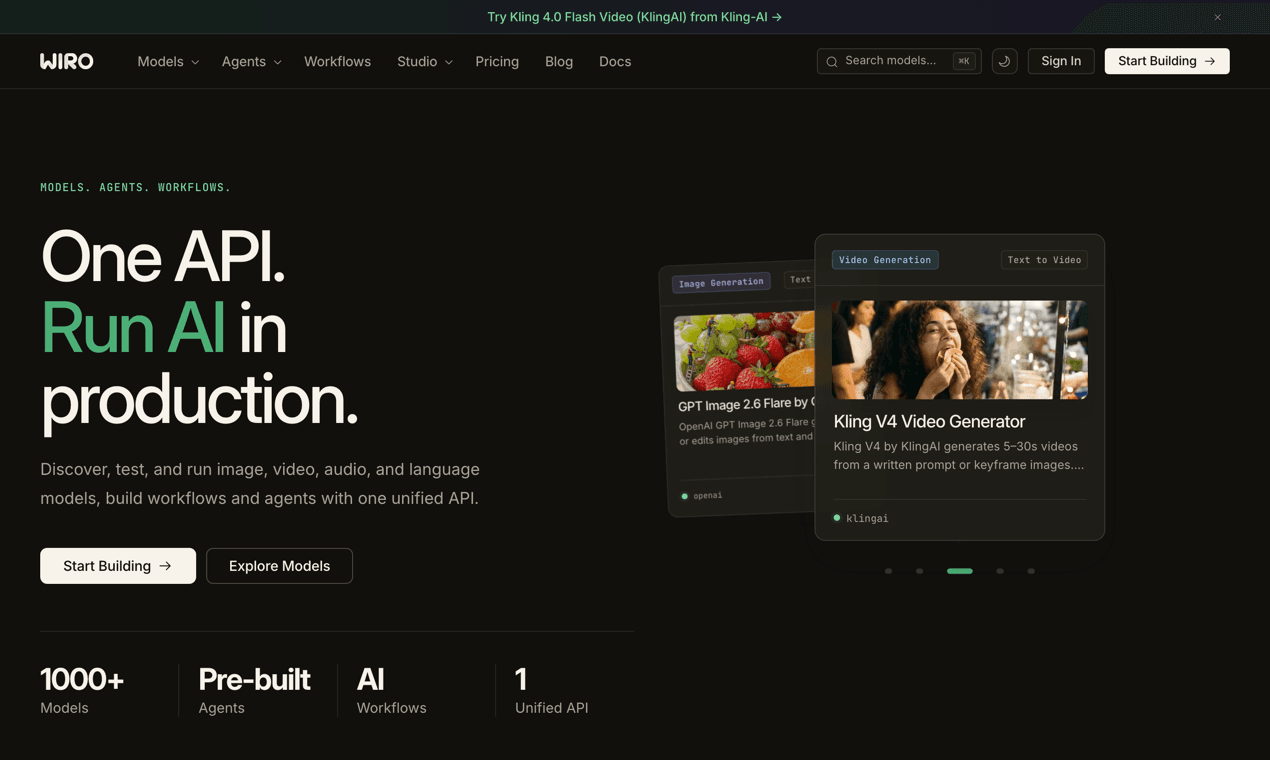
Adding generative AI to a product rarely stops at one model. An app might need an image model for thumbnails, a video model for short clips, a voice for narration and an LLM for chat. Each comes from a different vendor, with its own account, API format, billing and rate limits. Some of the best open models aren't offered as an API at all, so you'd have to run GPUs yourself.
Wiro AI is built to remove that integration work. It gives developers one API for more than 1,000 models covering image, video, audio, music, 3D and language, plus a way to chain models into workflows and to deploy AI agents that connect to tools like Gmail, HubSpot or Google Ads. You pay per run, with no subscription for the model API. You can browse the catalog on Wiro AI's official website.
This review explains what Wiro AI does, how its API, LLM gateway, workflows and agents work, how billing works and who it's best suited to.
What Is Wiro AI?
Wiro AI is a generative AI platform for developers and product teams. Its core promise is that you can discover, test and run models from many providers through a single API, without managing GPUs or opening an account with every model vendor.
The catalog spans text to image, image editing, image to video, text to speech, speech to text, voice cloning, realtime conversation, music generation and large language models. It includes models from providers such as KlingAI, ByteDance (Seedream and Seedance), Google (Nano Banana and Gemini), OpenAI, MiniMax, ElevenLabs and Moonshot, alongside open models that Wiro hosts on its own GPUs.
On top of the model API, Wiro adds three layers:
- An LLM gateway compatible with the OpenAI and Anthropic APIs.
- Workflows that chain several models into one saved pipeline.
- AI agents that you deploy, connect to your accounts and give tasks.
Wiro AI is listed in the AI category on CodeHype, and you can read the maker's own description on the Wiro AI product listing.
Key Features of Wiro AI
One Request Format for Every Model
Every model on Wiro takes the same kind of request. You call the Run endpoint with the model's owner and name plus its inputs, and Wiro returns a task ID straight away instead of making you wait while the model works. That matters for video and audio models, which can take a while to finish.
You then get the result in whichever way suits your app:
- Polling the task detail endpoint.
- A WebSocket that streams task progress and outputs live.
- A webhook that Wiro calls when the task completes.
Completed tasks return file URLs and metadata, along with two cost fields: the list price of the run and the amount actually charged after any discount. Requests use an API key, and projects can also use signature-based authentication for stricter security.
1,000+ Image, Video, Audio and 3D Models
Wiro lists more than 1,000 models across 15 categories. A few examples from the catalog:
- Image generation and editing: Seedream, Nano Banana, GPT Image, MiniMax image models, FLUX, Ideogram and Qwen Image.
- Video generation: Kling and Seedance models for text to video and image to video.
- Audio and speech: text to speech, voice cloning, music generation and ElevenLabs Scribe for speech to text.
- Language models: Gemini, Kimi and many others through the LLM gateway.
Because every model shares the same request pattern, swapping one image model for another is mostly a matter of changing the model name and inputs, not rewriting an integration.
An OpenAI- and Anthropic-Compatible LLM Gateway
For language models, Wiro runs a separate gateway that speaks the formats most AI code already uses:
- OpenAI Chat Completions and Responses, at an OpenAI-compatible base URL.
- Anthropic Messages, so the Anthropic SDKs and Claude Code can point at Wiro.
The catalog covers models from OpenAI, Anthropic, Google, Meta, Mistral, DeepSeek, Qwen, Moonshot, xAI, ByteDance and others. Existing SDK code usually only needs a new base URL and a Wiro API key. Streaming is supported, and each response includes the billed amount, so you can track spend per call. Capabilities such as tool calling differ by model, so Wiro recommends checking each model's details before you rely on a feature.
Workflows: Chain Models Into One Pipeline
A workflow is a saved graph of steps. Each step runs one model or a built-in utility, and steps can use the outputs of earlier steps. For example, one step might generate an image, the next turn it into a video, and a third add a voiceover.
The details are well thought out:
- Parallel layers. Steps that don't depend on each other run at the same time.
- Resume after failures. If a step fails because of a temporary error, you can resume the run. Completed steps keep their outputs and aren't charged again.
- Breakpoints. A run can pause at a chosen step so you can check the output before continuing.
- Run with new inputs via the API. Save a workflow once, then call it with different inputs from your app.
- A public gallery. Workflows can be published for others to run or clone into their own workspace. Protected workflows let people run them without seeing the steps.
You can build workflows yourself or describe what you want to the Workflow Agent, which designs them by chat.
Studio: Create Media by Chatting
Studio is Wiro's creative agent. Instead of picking models yourself, you describe the image, video or audio you want and Studio chooses and runs the models for you. It's useful for exploring the catalog or producing assets without writing code.
Hosted AI Agents
Wiro also lets you deploy autonomous AI agents that handle ongoing work such as content, ads, reviews, support and calls. You can start from a pre-built agent, such as a Google Review Manager, Video Creator, TikTok Ads Manager, Voice Receptionist, Lead Generation Manager or Newsletter Manager, and customize it. Or you can build your own from instructions, skills and knowledge.
Agent features include:
- Connectors for services such as Gmail, HubSpot, Apollo, Google Ads, GA4, Mailchimp, WordPress, Google Drive, LinkedIn, Instagram, X and Telegram, using OAuth or your own keys.
- Knowledge from Google Drive, uploaded files, API endpoints and session memory.
- Guardrails written in plain English, such as redacting personal data or escalating when the agent is unsure, plus evaluations you can run before shipping changes.
- Several ways to reach an agent: REST, WebSocket, webhooks, chat and scheduled tasks.
- Versioned instructions that can be changed without redeploying.
Developer Tooling: SDK Examples, MCP and n8n
Wiro's documentation includes code examples in curl, Python, Node.js, PHP, C#, Swift, Dart, Kotlin and Go, and there's a dedicated Node.js library.
The Wiro MCP server connects AI assistants to Wiro's models, workflows, Studio and agents. Wiro documents setup for Cursor, Claude Code, Claude Desktop, ChatGPT, VS Code, Gemini CLI, Windsurf and other MCP clients. You can use the hosted server with a browser sign-in or run the open-source package yourself. Paid actions, such as model runs, ask for your confirmation before you're charged.
There's also an n8n integration for teams that build automations there.
How Wiro AI Works
A typical integration follows four steps:
- Choose a model from the catalog, and test it in the browser if you like.
- Send a request to the Run endpoint with your inputs and API key.
- Track the task by polling, over a WebSocket or with a webhook.
- Retrieve the output: file URLs, metadata and the charged cost.
For language models, you point your existing OpenAI or Anthropic SDK at the Wiro gateway instead. For multi-step generation, you save a workflow and call it with new inputs.
Wiro AI Use Cases
- Apps with AI media features. Add image generation, photo editing, video clips or voiceovers to a mobile or web app through one integration.
- Marketing and content teams. Produce ad creatives, product visuals and short videos, or run a pre-built agent that manages ads, reviews or newsletters.
- Prototyping across models. Compare several image or video models on the same prompt without opening an account with each provider.
- Multi-step media pipelines. Chain generation, editing, upscaling and narration into one workflow your backend can call.
- AI coding assistants. Use the MCP server to let Claude Code or Cursor search models, run them and manage workflows from your editor.
- LLM apps. Route OpenAI- or Anthropic-style requests to many model providers through one gateway and one bill.
Wiro AI Pricing
Wiro uses pay-per-use pricing, with no subscription for running models:
- You pay per execution, at a public price for each model. Depending on the model, pricing is per image, per token or another unit.
- Only successful runs are billed. In workflows, failed steps aren't charged, and utility steps are free.
- Billing draws on a wallet balance. For workflow runs, the wallet must hold at least $0.50 per model step before the run starts.
- Responses report the cost of each task or LLM call, so you can track spend in your own app.
- AI agents run on plans you choose when deploying an agent. Agent plan prices weren't listed on the pages we reviewed.
Wiro's pricing page includes a calculator that shows what a given budget buys across models. Model prices vary widely and change as new models are added, so check the current prices on Wiro's website before estimating costs.
Who Should Use Wiro AI?
Wiro AI is a good fit for:
- Developers and product teams adding generative image, video, audio or LLM features without managing GPUs or many vendor accounts.
- Mobile app builders, given the code examples for Swift, Kotlin and Dart.
- Agencies and marketers who want ready-made agents for ads, reviews, content and lead generation.
- Teams using AI coding tools who want Wiro's models and workflows available inside Claude Code, Cursor or ChatGPT through MCP.
If you only need one model from one provider and already have that integration in place, a single-vendor API may be simpler.
Advantages and Limitations
Advantages
- One API and one bill for more than 1,000 models across image, video, audio, 3D and language.
- Asynchronous task design with polling, WebSocket and webhook options, which suits slow video and audio jobs.
- OpenAI- and Anthropic-compatible LLM gateway, so existing SDK code can switch with a new base URL.
- Workflows that resume after failures without charging completed steps again.
- Pay-per-use billing with charges only for successful runs.
- Broad tooling: an MCP server for many AI clients, an n8n integration and code examples in nine languages.
Limitations
- Prices vary by model and can change, so budgeting takes some checking per model.
- Model capabilities differ. Features such as tool calling depend on the model, so check before you build around one.
- Agent plan pricing isn't shown upfront on the public pages we reviewed.
- Third-party models depend on their providers' availability and pricing.
Final Verdict: Is Wiro AI Worth It?
Wiro AI is a strong option for teams that want broad access to generative models without stitching together a dozen vendor APIs. The consistent task-based API, the OpenAI- and Anthropic-compatible LLM gateway and resumable workflows make it practical to build real features, not just demos. The hosted agents and MCP server extend it from a model API into a platform that can run ongoing work.
Because pricing is per model and per run, test the specific models you plan to use and check their prices before you commit to a high volume. If you're building image, video, audio or LLM features and want one integration instead of many, visit the official Wiro AI website to explore the catalog and run your first model.
For another way to reach many models through a single API, see our OpenAdapter review.
Frequently Asked Questions
What is Wiro AI?
Wiro AI is a generative AI platform that gives developers one API for more than 1,000 image, video, audio, 3D and language models. It also offers workflows that chain models together and hosted AI agents.
How does the Wiro AI API return results?
When you run a model, Wiro returns a task ID immediately. You get the result by polling the task detail endpoint, listening on a WebSocket or receiving a webhook when the task completes.
Is Wiro AI compatible with the OpenAI and Anthropic SDKs?
Yes, for language models. Wiro's LLM gateway supports OpenAI Chat Completions, OpenAI Responses and Anthropic Messages, so existing SDK code can usually switch by changing the base URL and API key.
How much does Wiro AI cost?
Wiro is pay-per-use, with a public price for each model and no subscription for model runs. Only successful runs are billed. AI agents run on plans you choose when you deploy them.
Can I use Wiro AI with Claude Code or Cursor?
Yes. The Wiro MCP server works with Claude Code, Cursor, Claude Desktop, ChatGPT, VS Code and other MCP clients. It can search and run models, manage workflows and talk to your agents, and it asks for confirmation before paid actions.
What happens if a step in a Wiro workflow fails?
The run stops and later steps are skipped. You can resume the run after a temporary error, and steps that already completed keep their outputs without being charged again.