Developer Tools
Design Extractor Review: Turn Any Website Into a DESIGN.md for AI Coding Agents
Design Extractor turns a public website into a DESIGN.md with colors, typography, spacing and components that Claude Code, Cursor and Codex can follow.
CodeHype8 min read
AI coding agents are good at writing working UI code, but left to their own devices they tend to produce interfaces that look generic. Telling an agent to "make it look like this site" rarely works either, because the agent can't see the exact colors, type scale, spacing and component styles behind the design.
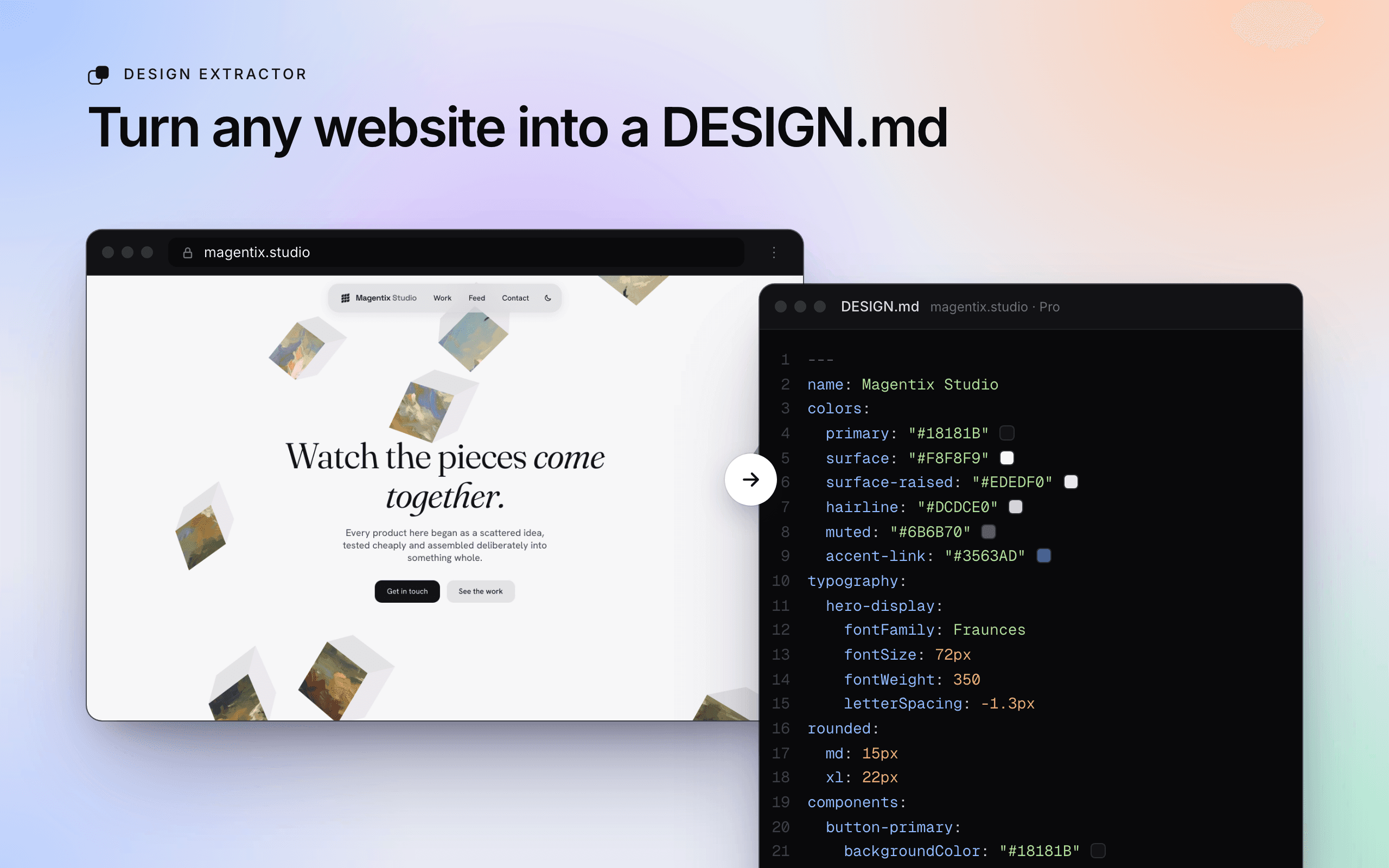
Design Extractor solves this by turning a public website into a DESIGN.md file, a Markdown design system with precise tokens and written guidance that AI coding agents like Claude Code, Cursor and Codex can follow. You can paste a URL on the web, use the Chrome extension, or let your agent run the extraction itself. See examples and pricing on Design Extractor's official website.
In this review, we'll explain what a DESIGN.md contains, how Design Extractor builds one, how to use it with your agent, and what the credit-based pricing costs.
What Is Design Extractor?
Design Extractor is a web service that analyzes a publicly accessible website and generates a DESIGN.md file describing its visual design. It opens the site in a real browser, measures the colors, fonts, spacing, corner radii and components the site actually uses, and writes them into a structured file.
The file follows the open DESIGN.md format published by Google Labs (currently labeled alpha), which you can read about in the DESIGN.md specification on GitHub. Because the format is shared, the output is meant to work with any coding agent that reads Markdown project files.
Design Extractor is operated by Magentix Studio, based in Mannheim, Germany. It is aimed at developers and small teams without a dedicated designer, people capturing a site's look before a rebuild, and anyone prototyping from reference sites. You'll find it in the Design category on CodeHype and on its CodeHype listing.
What's Inside a DESIGN.md?
A DESIGN.md generated by Design Extractor has two parts.
Design Tokens
YAML front matter at the top of the file holds tokens for:
- Colors
- Typography
- Corner radius (rounded)
- Spacing
- Components
Written Design Guidance
The Markdown body follows the standard sections in order: Overview, Colors, Typography, Layout, Elevation & Depth (where shadows are described), Shapes, Components, and Do's and Don'ts. Pro extractions can add Responsive Behavior, an Iteration Guide and a Known Gaps section that is honest about what couldn't be captured precisely.
Key Features of Design Extractor
Measured Values, Not Guesses
Rather than asking an AI model to guess a site's style from a screenshot, Design Extractor reads rendered styles in a real browser and also uses screenshots. That keeps hex values, font sizes and spacing close to what the site actually uses.
Component Recipes Checked Against the Original
For each component, Design Extractor produces a distilled HTML and CSS recipe, then checks it against the live site with a structural match and a pixel comparison. Components that don't pass are flagged with a reason rather than silently included.
Lite and Pro Extractions
- Lite extracts a single page.
- Pro samples the site's key pages (about five) for a fuller design system.
Each run takes at least a minute.
Three Ways to Run an Extraction
- On the website: paste a URL and choose Lite or Pro.
- Chrome extension: extract the page you're currently viewing. The extension is free, uses your existing login, shows your credit balance and only asks for access to the active tab and the Design Extractor site.
- From your coding agent: through the MCP server or the Claude Code and Codex plugin.
MCP Server and Agent Plugin
The MCP server uses streamable HTTP. You can sign in with OAuth from clients such as Claude, ChatGPT, Claude Code and Codex, or use a personal API key in tools like Cursor. Its tools let an agent check pricing and credits, start an extraction, and fetch results.
The Claude Code / Codex plugin bundles the server with a skill that applies the DESIGN.md tokens to your project, mapping them onto Tailwind, CSS variables or a tokens file.
Region-Specific Extraction
If a site shows different content by region or blocks some locations, you can run the extraction through a browser in one of about 40 countries for a surcharge. If that run still fails, the credits are refunded.
Free Gallery and Tools
A free gallery offers pre-extracted DESIGN.md files for well-known sites, and free tools include a DESIGN.md validator, a website font finder and a color palette extractor, which don't require sign-up.
How Design Extractor Works
- Sign up and buy a credit pack.
- Start an extraction by pasting a public URL, clicking Extract in the Chrome extension, or asking your agent through MCP or the plugin. Choose Lite or Pro.
- Wait for the run. Design Extractor renders the page in a browser and measures tokens and components. This takes at least a minute.
- Review the result in My extractions, where you can copy, download or edit the DESIGN.md.
- Add it to your repository, typically at the root, and reference it from your CLAUDE.md, AGENTS.md or Cursor rules so every session builds on it.
Use Cases
Giving an AI Agent a Visual Direction
A developer starting a new project can extract a reference site they like and give the DESIGN.md to Claude Code or Cursor, so new pages share a consistent palette, type scale and component style.
Documenting a Site Before a Rebuild
Teams migrating an existing site to a new framework can extract the current design first, so the rebuilt version keeps the same tokens and components.
Prototyping Without a Designer
Small teams can use the gallery or their own extractions as a starting point for prototypes, instead of designing from scratch.
Pairing With a Component Library
A DESIGN.md works well alongside component libraries. For example, you could apply extracted tokens to the theme of animated shadcn/ui components like those covered in our Hairline UI review.
Design Extractor Pricing
Design Extractor uses prepaid credits rather than a subscription, and credits don't expire. A Lite extraction costs 6 credits, and a Pro extraction costs 10. The pricing page lists three packs at the time of writing:
| Pack | Price | Credits | Approximate extractions |
|---|---|---|---|
| Starter | $5 | 50 | Up to 8 Lite or 5 Pro |
| Plus | $10 | 110 (10% bonus) | Up to 18 Lite or 11 Pro |
| Max | $25 | 300 (20% bonus) | Up to 50 Lite or 30 Pro |
A few notes:
- Running an extraction from a specific country adds 6 credits.
- Requesting a site you extracted recently reuses your earlier result at no charge.
- Prices are in US dollars, with tax shown at checkout.
- No free credits or trial were listed, but the gallery and free tools let you preview the output format.
Who Should Use Design Extractor?
Design Extractor is a good fit for:
- Developers using AI coding agents who want consistent, intentional UI
- Indie hackers and small teams without a designer
- Teams rebuilding or migrating a website who want to capture the existing design system
- Agencies prototyping from client or reference sites
It isn't designed for private apps, local development servers or pages behind a login.
Advantages and Limitations
Advantages
- Measured tokens from rendered styles rather than AI guesses
- Verified component recipes, with failures flagged instead of hidden
- Open format that follows the DESIGN.md specification
- Agent-native workflow via MCP server, plugin and Chrome extension
- No subscription, and credits never expire
Limitations
- Public pages only. Logins, localhost and private networks aren't supported, because the server captures the page itself.
- Recipes can be approximate. Each file includes a Known Gaps section listing where results differ from the original.
- No assets. Logos, icons and images aren't included, and commercial fonts are named with suggested open-source alternatives where possible.
- Chrome-only extension with a deliberately small first version.
- Use responsibly. Design Extractor's terms describe the output as a design reference and warn that building something too close to the original site could raise trademark, trade dress or competition law issues.
Final Verdict: Is Design Extractor Worth It?
Design Extractor addresses a real gap in AI-assisted development: agents write code well but need concrete design guidance to produce consistent interfaces. Turning a reference site into a measured, spec-compliant DESIGN.md, with verified component recipes and an honest list of known gaps, gives them that guidance.
With packs starting at $5 and credits that never expire, it's inexpensive to try on one or two reference sites. Use it as design reference rather than a way to clone a site, and it can save a lot of back-and-forth with your coding agent. Visit the official Design Extractor website to browse the gallery and run your first extraction.
Frequently Asked Questions
What is a DESIGN.md file?
A DESIGN.md is a Markdown file that describes a design system, with YAML design tokens for colors, typography, spacing, radius and components, followed by written guidance. AI coding agents read it to build UI that matches the design.
How much does Design Extractor cost?
Credit packs cost $5 for 50 credits, $10 for 110 credits and $25 for 300 credits. A Lite extraction uses 6 credits and a Pro extraction uses 10. There's no subscription, and credits don't expire.
Which AI coding tools work with Design Extractor?
The DESIGN.md works with agents such as Claude Code, Cursor and Codex. The MCP server supports clients including Claude, ChatGPT, Claude Code, Codex and Cursor, and there's a plugin for Claude Code and Codex.
Can Design Extractor extract a site behind a login?
No. It only works on publicly accessible pages. Logged-in areas, localhost and private networks aren't supported.
Does Design Extractor copy images and logos?
No. It extracts design tokens and component recipes, not assets such as logos, icons or images.
Is it legal to extract another website's design?
Design Extractor's terms describe the DESIGN.md as an analytical summary for design reference and inspiration, and warn that building something too close to the original could infringe trademark, trade dress or competition law. Use it as a reference, not to clone a site.