Developer Tools
Wipecraft Review: A Mac System Data Cleaner Built for Claude Code, Codex, Cursor and Xcode Users
Wipecraft review: see what's inside Mac System Data, clean up after Claude Code, Codex, Cursor and Xcode safely, with a free scan and 30-day undo.
CodeHype10 min read
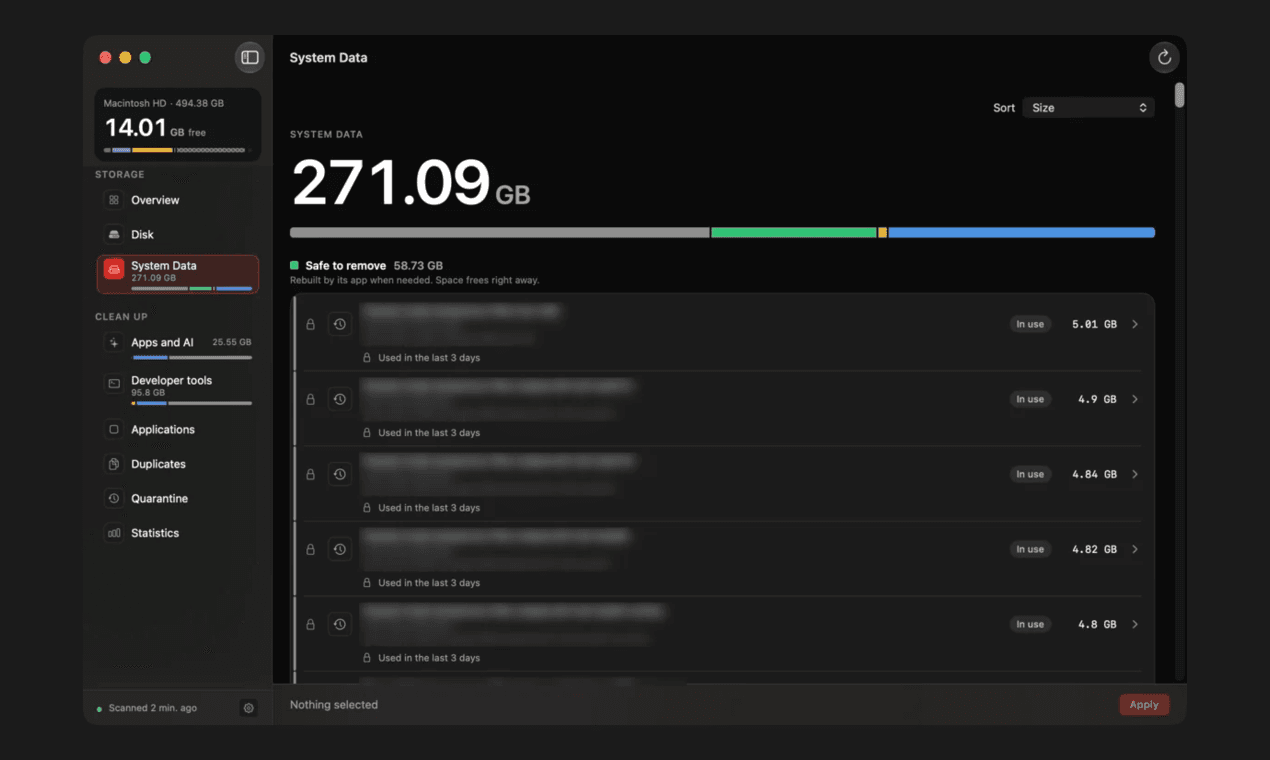
If you open Storage settings on a Mac used for development, there's a good chance System Data is one of the biggest bars. macOS shows it as a single number with no breakdown, so you can't tell what's inside or what's safe to delete. For developers the problem is worse: AI coding agents, Xcode, simulators, Docker, package managers and local models all leave large amounts of data behind.
Wipecraft is a Mac System Data cleaner built for exactly that situation. It splits System Data and the rest of your disk into named items, shows each item's size and what removing it does, and knows what tools like Claude Code, Codex, Cursor and Xcode leave behind. It also checks your git status and running processes before it offers anything, so it doesn't remove work in progress. You can learn more on Wipecraft's official website.
This review covers what Wipecraft finds, how its safety checks work, how it fits into an AI coding workflow, what it costs and who it's for.
What Is Wipecraft?
Wipecraft is a native macOS app for understanding and cleaning disk space, with a particular focus on the System Data category. It's made by BlitzCortex, the studio of developer Berkay Türk.
Its main audience is developers who work with AI coding agents. Those tools create session histories, caches, git worktrees and model files that ordinary Mac cleaners don't recognize, or that they might delete while you're still using them. Wipecraft is designed to know the difference.
Wipecraft is listed in the Developer Tools category on CodeHype, and you can read the maker's summary on the Wipecraft product listing.
What Wipecraft Finds
System Data, Broken Into Named Parts
Wipecraft lists what makes up System Data and also splits the whole disk into macOS, Apps, Your files and System Data. Every item shows its size and what happens if you remove it. Items are grouped into clear buckets:
- Your Mac needs this: data you shouldn't remove.
- Safe to remove: data the owning app rebuilds when needed.
- Comes back: data that will return as you keep using your tools.
- Your call: data that only you can decide about.
- Not shown by macOS: space that macOS doesn't report clearly.
AI Coding Agents and AI Apps
This is what sets Wipecraft apart from general cleaners. It recognizes data from Claude Code, Codex, Claude Desktop and Cursor, including session histories and git worktrees created by agents. It also finds local AI models from Ollama, LM Studio and Hugging Face.
Agent worktrees are listed by tool, and Wipecraft tells you which ones are clean. Session histories can be archived instead of deleted, so you don't lose a record of past agent work.
Developer Tools and Caches
Wipecraft also covers the usual sources of developer disk bloat:
- Xcode and simulators
- Android emulators
- Docker
- Package manager caches such as npm, pnpm, Yarn, pip and Homebrew
- Build artifacts, such as node_modules and build folders in projects that have been idle for 30 days
- Editor data
Apps and Their Leftovers
When you uninstall an app with Wipecraft, it quits the app if it's open and moves both the app and its leftovers (Application Support, Caches, Preferences, Containers, login items and logs) to Quarantine.
The app's sidebar also includes Duplicates, Quarantine and Statistics sections, and the maker's CodeHype listing describes further whole-disk tools, such as large and old files, empty folders and a What changed view that shows which folders grew since yesterday.
How Wipecraft Keeps Your Work Safe
Deleting the wrong cache is an inconvenience. Deleting an agent's worktree with uncommitted changes is real lost work. Wipecraft is designed around that difference.
Locks on Anything in Use
Wipecraft locks items while their tools are active: while Claude Code or Codex is running, while Cursor or Claude Desktop is open, while a simulator is booted, or while Docker or an editor is running.
Worktree Checks Based on Git
A git worktree is only offered for removal if it's clean, hasn't changed for 7 days (the default), and its commits are already on main or a remote. Wipecraft checks this again right before removing anything. An optional check through the GitHub CLI can lift the lock when a pull request was squash-merged.
Nothing Selected by Default
Wipecraft never preselects items. You choose what to clean, and the Select recommended option only picks items from the Safe to remove and Comes back buckets.
A 30-Day Quarantine With Restore
Anything that doesn't rebuild itself goes to Quarantine for 30 days, and you can restore it during that time. Safe-to-remove items, such as rebuildable caches and logs, are removed directly. Anything that can't be undone needs a second confirmation.
How Wipecraft Works
The workflow has three stages:
- Scan. The scan is read-only. Wipecraft reads sizes, dates and the status of your tools (such as git, simulators and Docker) and uploads nothing.
- Review. Items appear in their buckets with nothing preselected. You can filter by age, source and safety level.
- Clean. Each bucket has its own removal path: safe items are removed directly, Your call items go to Quarantine, worktrees are removed through git, and tool commands need a second confirmation.
Scanning is free, so you can see what Wipecraft finds before deciding to buy a license.
Automation, CLI and AI Agent Integrations
Optional Monitoring and Cleanup Rules
Wipecraft can run a daily check, show a menu bar icon and send alerts. You can also set automatic cleanup rules in Settings. These options are off by default, and cleanup rules only move items to Quarantine or the archive, so automated cleaning stays reversible.
Command-Line Tool
The command-line tool can scan your disk and report status as JSON. Its clean command is a dry run until you add the apply flag, which makes it safe to try in scripts.
MCP Server and Claude Code Plugin
Wipecraft includes an MCP server, so AI coding agents can check disk usage for you. Cleaning through MCP is off by default and needs a license. There's a Claude Code plugin with status and tidy commands, and plugins are also available for Codex, Cursor and Antigravity.
On-Device AI Mode
On macOS 26 with Apple Intelligence, an AI mode answers questions about your disk using Apple's on-device model. It only sees summary numbers and makes no network calls. According to the maker's listing, it can set a list filter or explain what it sees, but it can't select or delete anything.
Privacy
Wipecraft's privacy page is short and specific: no account, no telemetry and no analytics. It doesn't send file names, paths or scan results anywhere. The only network calls it lists are license activation and checks through Polar, update checks, opt-in crash reports with paths removed, and the optional GitHub merge check through your own GitHub CLI login, which is on by default and can be turned off.
Requirements and Languages
- macOS: 14 Sonoma or later
- Hardware: Apple silicon or Intel Macs
- Distribution: downloaded directly from the maker, not from the Mac App Store; signed and notarized by Apple
- Full Disk Access: optional; it lets Wipecraft include Mail downloads, Messages attachments and iOS backups
- Languages: 11, including English, Simplified Chinese, Japanese, German, French, Spanish, Brazilian Portuguese, Korean, Russian, Italian and Turkish
Use Cases
Developers Running AI Coding Agents
If you use Claude Code, Codex or Cursor heavily, Wipecraft can show how much space agent sessions, worktrees and caches take and clean the finished ones without touching active work.
iOS and macOS Developers
Xcode data, simulators and build output are some of the largest items on a developer's Mac. Wipecraft lists them by size and explains what each one does before you remove it.
Anyone Running Local Models
Ollama, LM Studio and Hugging Face models can take tens of gigabytes. Wipecraft lists them alongside the other AI data, so you can see which ones are taking the most space.
Mac Users Puzzled by System Data
You don't need to be a developer to benefit. The free scan alone explains what System Data contains on your Mac. If you're interested in other privacy-focused Mac tools, see our review of QuietSpeech, an offline dictation app for Mac.
Wipecraft Pricing
Wipecraft uses a free scan and a one-time license for cleaning:
| License | Launch price | Regular price | Macs |
|---|---|---|---|
| Individual | $9.99 one-time until November 17, 2026 | $19 one-time | 2 |
| 5-Mac (family or small team) | $19 one-time until November 17, 2026 | $29 one-time | 5 |
- Scanning is free; cleaning needs a license.
- No subscription and no account. One payment covers updates for the current major version.
- 14-day refund through Polar.
- Licenses can be moved: release one Mac and activate another.
Launch prices end on November 17, 2026, so check Wipecraft's website for the current price.
Who Should Use Wipecraft?
Wipecraft is best for:
- Developers using AI coding agents who keep running low on disk space.
- Apple platform developers with large Xcode and simulator data.
- People running local AI models on their Mac.
- Privacy-conscious Mac users who want a cleaner with no account and no telemetry.
Advantages and Limitations
Advantages
- Explains System Data in named parts instead of one number.
- Understands AI coding agents, including sessions and worktrees.
- Strong safety model: in-use locks, git-based worktree checks, nothing preselected, 30-day Quarantine and second confirmations.
- Free scan before you pay.
- One-time price with no subscription.
- CLI, MCP server and agent plugins for automation.
- No account and no telemetry.
Limitations
- Mac only, and it requires macOS 14 Sonoma or later.
- AI mode needs macOS 26 with Apple Intelligence.
- Not on the Mac App Store, so updates and licensing go through the maker and Polar.
- Cleaning needs a paid license, and so do automatic cleanup rules and cleaning through MCP.
- Safe-to-remove items are deleted directly rather than quarantined, although those are caches and logs that their apps rebuild.
Final Verdict: Is Wipecraft Worth It?
Wipecraft fills a real gap. Most Mac cleaners treat developer data as generic clutter, and none of them understand what an AI coding agent is doing in the background. Wipecraft explains System Data clearly, recognizes the tools developers actually use, and has clearly been built with care around not deleting work in progress. The free scan makes it easy to see what you could reclaim, and the one-time license is inexpensive compared with subscription cleaners.
If your Mac's System Data keeps growing and you work with Claude Code, Codex, Cursor or Xcode, it's well worth running a scan. Visit the official Wipecraft website to download it and see what's taking up your disk.
Frequently Asked Questions
What is System Data on a Mac?
System Data is the category macOS uses for storage that doesn't fit its other categories, such as caches, logs, local snapshots and app support files. macOS shows it as one number. Wipecraft breaks it down into named items with their sizes.
Is Wipecraft free?
Scanning is free. Cleaning requires a one-time license: $19 for 2 Macs, or $9.99 during the launch offer until November 17, 2026. A 5-Mac license is also available.
Will Wipecraft delete my AI agent's work in progress?
It's designed not to. Wipecraft locks agent sessions and tools that are in use, and only offers worktrees that are clean, unchanged for 7 days and already pushed or merged. It rechecks this right before removal.
Can I undo a cleanup?
Most items go to Quarantine for 30 days and can be restored. Rebuildable caches and logs are removed directly because their apps recreate them.
Does Wipecraft collect my data?
No. Wipecraft has no account, telemetry or analytics, and it doesn't send file names, paths or scan results. Crash reports are opt-in.
Which macOS versions does Wipecraft support?
macOS 14 Sonoma or later, on Apple silicon and Intel Macs. The on-device AI mode needs macOS 26 with Apple Intelligence.