Developer Tools
Hairline UI Review: Next.js Landing Page Templates and Free Animated shadcn/ui Components
Hairline UI offers original Next.js landing page templates and 158 free animated shadcn/ui components, plus an MCP server for AI coding agents.
CodeHype8 min read
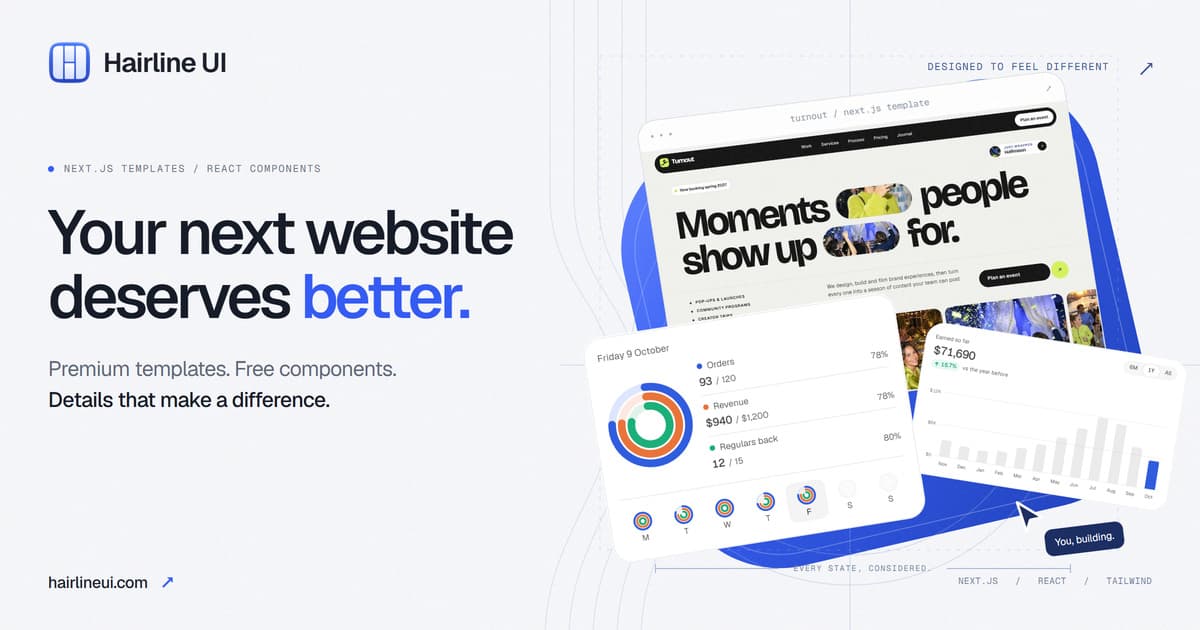
AI coding tools have made it cheap to produce a landing page, and as a result many landing pages now look the same: a centered hero, a gradient, three feature cards and a pricing table. Standing out takes a distinct concept, considered typography and motion that feels intentional.
Hairline UI is built around that problem. It offers premium Next.js landing page templates, each designed around its own concept rather than a recolored theme, alongside a free library of animated shadcn/ui components that you can install with a single command. Browse the templates and live demos on Hairline UI's official website.
In this review, we'll look at what the templates and components include, how they fit into a Next.js or React workflow, what they cost, and what the license allows.
What Is Hairline UI?
Hairline UI is a library with two parts:
- Next.js landing page templates. Each template is a complete website with its own concept, layout, copy, typography and motion. Most are paid, and some are free with an account.
- Free animated components. A collection of React components built for shadcn/ui, with designed states and motion, released under the MIT license.
It is aimed at founders, indie hackers, agencies and developers who want a polished, motion-rich landing page or interactive interface without building every detail by hand. Hairline UI is listed in the Design category on CodeHype, where you'll also find its product page and screenshots.
Hairline UI Templates
Original Concepts, Not Recolored Themes
At the time of writing, the template library contains 49 templates across categories including AI products, SaaS and developer tools, agencies and studios, fintech and commerce, apps and courses, and dashboards. Six of them are free.
The core idea is that each template starts from its own concept. Instead of swapping colors on one layout, each site has its own structure, copy and motion designed for that idea.
Live Demos on Every Screen Size
Every template has a live demo that runs as a real build, and you can switch between desktop, laptop, tablet and phone widths before buying. That makes it easy to check responsive behavior, not just the hero section.
A Standalone Next.js Project You Own
Each template is a standalone project built with Next.js, React and TypeScript, styled with Tailwind CSS or plain CSS. For example, one template page lists Next.js 16, Tailwind v4 and TypeScript, with 12 sections and Node 20.9 or later required.
No API keys or environment variables are needed to run a template.
One Config File for Your Content
Words, links, prices and colors live in a single configuration file (site.config.ts), with separate folders for longer content such as stories and legal pages. Rebranding a template is mostly a matter of editing that file and the palette.
Free Animated shadcn/ui Components
158 Components With Designed States and Motion
The component library includes 158 free components, according to the website. These are interactive elements with motion built in, such as labels that morph, numbers that roll and buttons that show their progress.
They are free to use without an account and are MIT licensed.
Install With the shadcn CLI
Components install with the standard shadcn CLI, using Hairline UI's registry URL. For example:
- npx shadcn@latest add hairlineui.com/r/status-button.json
You can also add an optional @hairline namespace to your components.json file and install components by name.
Requirements are React 19, Tailwind v4, shadcn theme variables and lucide-react. No provider or animation library is needed, and components follow your shadcn theme in both light and dark mode. They work in Vite projects as well as Next.js.
MCP Server for AI Coding Agents
Hairline UI provides a free, read-only MCP server that requires no API key. Once connected, coding agents can search components, find components for a particular screen, read component source and get the install command.
The documentation lists setup for a wide range of tools, including Claude Code, Codex, Cursor, VS Code, Windsurf, Cline, Gemini and Copilot. For agents that browse rather than connect, Hairline UI also publishes llms.txt files and Markdown versions of its component docs.
Free Browser Tools
The website also includes free browser-based design tools, such as a background pattern generator, a dither tool, an easing and spring editor, a social card generator and a theme generator.
How Hairline UI Works
Using a Template
- Browse the templates and try the live demos at different screen widths.
- Sign in to download a free template, or buy a paid one.
- Download the source from your account and unzip it.
- Run npm install and npm run dev to start it locally.
- Edit site.config.ts to replace the words, links, prices and colors.
- Deploy to any host that supports Next.js.
Demo brands, quotes and figures in the templates are placeholders, and the license says they must be replaced before launch.
Using the Components
Initialize shadcn in your project, then add components by registry URL, by @hairline name, or by asking your AI coding agent to find and install them through the MCP server.
Hairline UI Pricing
According to the pricing section on the Hairline UI homepage at the time of writing:
| Option | Price | What you get |
|---|---|---|
| Free | $0 with an account | The 6 free templates, commercial license, free updates |
| Single template | $39 one-time | One complete template project, setup guide, free updates to that template |
| All-Access | $149 one-time | Every current and future template, with free updates |
The components and the MCP server are free.
There is no subscription. A 14-day money-back guarantee applies, with no reason needed. After 14 days, refunds are only given in limited cases, such as a duplicate payment or a template that doesn't work as described and can't be fixed.
What the License Allows
Hairline UI uses one license for all templates, without tiers or seat counts. According to its license page, you can:
- Use templates in unlimited personal and client projects
- Modify them freely
- Hand the source code over to clients
You can't resell or redistribute the templates as a template, theme, starter kit or UI kit, publish them as templates in a public repository, or share your account or downloads outside your team or client project. The templates are provided as is, without warranty.
Use Cases
Launching a SaaS or AI Product
A founder can pick a template that matches their product category, edit the config file and deploy a distinctive landing page in an afternoon. If you're preparing for launch day, our guide to launching an AI tool on CodeHype explains how to get the finished product listed.
Agencies Building Client Sites
Because the license covers unlimited client projects and allows source handover, agencies can use templates as a starting point for client sites.
Adding Polish to an Existing App
Developers already using shadcn/ui can add animated buttons, counters and labels without bringing in a separate animation library.
Letting an AI Agent Pick Components
With the MCP server connected, you can ask a coding agent to find a suitable component for a screen and install it for you.
Who Should Use Hairline UI?
Hairline UI suits:
- Founders and indie hackers who want a landing page that doesn't look like every other AI-generated page
- Next.js and React developers who want production-ready, typed source code they own
- Agencies that need a strong starting point for client launches
- shadcn/ui users who want animated components that follow their existing theme
It's less suitable if you need a no-code website builder, or if your project doesn't use React.
Advantages and Limitations
Advantages
- Distinct designs. Each template has its own concept instead of shared layouts.
- Try before you buy. Live demos at four screen widths.
- Simple customization. One config file controls most of the content.
- Free, MIT-licensed components that need no extra animation library.
- MCP support for AI coding agents, also free.
- One-time pricing with a 14-day refund window.
Limitations
- Templates are React and Next.js only. They won't fit other stacks.
- Component requirements. You need React 19 and Tailwind v4.
- Placeholder content. Demo copy and figures must be fully replaced.
- Redistribution restrictions. Templates can't be resold or published as templates.
Final Verdict: Is Hairline UI Worth It?
Hairline UI is a strong option for developers who want a Next.js landing page with a distinct identity. The templates are complete projects with real motion and responsive demos, the config-file approach keeps customization simple, and the one-time pricing is easy to understand. The free component library and MCP server are useful even if you never buy a template.
If you're about to build a landing page with Next.js or shadcn/ui, start with a free template or a few components to judge the quality, then decide whether a single template or All-Access makes sense. Visit the official Hairline UI website to explore the live demos.
Frequently Asked Questions
What is Hairline UI?
Hairline UI is a library of Next.js landing page templates, each built around its own concept, plus a free collection of animated shadcn/ui components for React.
Are Hairline UI components free?
Yes. The component library is free, requires no account and is released under the MIT license.
How much do Hairline UI templates cost?
Six templates are free with an account. A single paid template costs $39 one-time, and All-Access to every current and future template costs $149 one-time.
What tech stack do the templates use?
Each template is a standalone Next.js, React and TypeScript project styled with Tailwind CSS or plain CSS. No API keys or environment variables are needed.
Can I use Hairline UI templates for client projects?
Yes. The license allows unlimited personal and client projects and lets you hand the source to clients, but you can't resell or redistribute the templates as templates.
Does Hairline UI work with AI coding agents?
Yes. Its free MCP server lets agents such as Claude Code, Cursor and Codex search for and install components.