AI Tools
WEXTL Review: Build AI Agents and Automate Workflows Across 1,600+ Apps
WEXTL review: a hosted workflow automation platform with AI agents, human approval steps, JavaScript, 1,600+ app integrations and unlimited team members.
CodeHype10 min read
Most teams have a list of jobs that are too small for an engineer and too repetitive for a person: scoring new leads, sorting support tickets, chasing invoice approvals, setting up accounts for a new hire. Workflow automation tools handle this kind of work, but teams often hit a wall. Per-seat pricing makes it expensive to let everyone build, simple tools struggle with loops and branching, and self-hosted options save money but leave you maintaining servers.
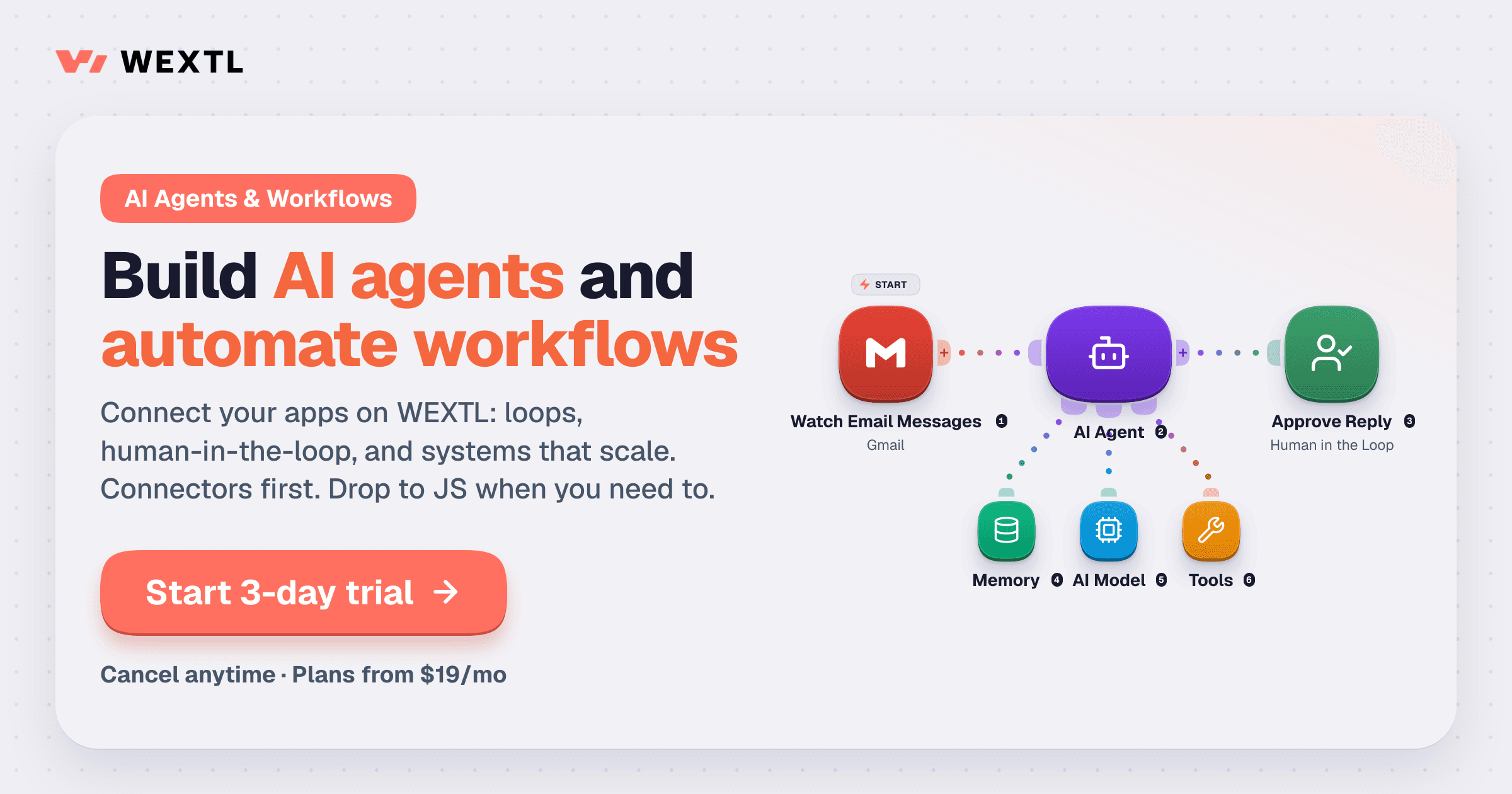
WEXTL is a hosted workflow automation platform built to cover that middle ground. You connect your apps, build workflows on a visual canvas, add AI agents that can call tools and models, and insert human approval steps wherever a person should make the call. When the built-in nodes aren't enough, you can drop in your own JavaScript. You can see the platform on WEXTL's official website.
This review explains what WEXTL does, its main features, how a typical workflow is built, what the plans cost and who it suits.
What Is WEXTL?
WEXTL is an AI agent and workflow automation platform made by MAXMEL Tech ltd. It describes itself as a tool that connects your apps, runs multi-step processes and keeps humans in the loop only where you need them.
The maker positions WEXTL against the tools most teams compare first. For teams on Make or Zapier, the pitch is more capability at a similar price, with every plan including unlimited members so a growing team doesn't add seats to the bill. For teams that looked at self-hosting n8n to save money, the pitch is the same kind of flexibility (loops, approval steps and custom code) without running servers, applying updates or managing backups yourself.
WEXTL is listed in the AI Automation category on CodeHype, and you can read the maker's own summary on the WEXTL product listing.
Key Features of WEXTL
AI Builder: Describe a Workflow in Plain English
You don't have to start from an empty canvas. The AI Builder takes a plain-English description, such as "send a Slack message when a Salesforce lead is created", then lays out the nodes, connects them and pre-fills fields from the apps you've already connected. You can keep chatting with it to edit the workflow afterwards.
A Visual Canvas for Triggers, Apps and Logic
Workflows live on an infinite canvas where triggers, app actions, conditions and AI steps sit side by side. Branches and error paths are visible on the canvas instead of being buried in nested settings, which makes larger workflows easier to read and review.
AI Agents With Models, Memory, Tools and MCP
The AI Agent node is the core of WEXTL's agent features. You choose a model, attach memory and give the agent tools, and the agent reasons over the data it receives and decides which tool to call. Any connected app can be wired in as a tool, and agents can hand work off to each other.
WEXTL also supports MCP. You can connect an MCP server and choose exactly which of its tools an agent is allowed to call. Tools you don't select can't be used, which is a useful safeguard when a server exposes destructive actions.
Human in the Loop Approvals
Some steps shouldn't run without a person's sign-off: a large refund, a high-value lead, a bill above a set limit. WEXTL's Human in the Loop node pauses the workflow, notifies the approver on Slack or email, and continues or stops based on a single approve or reject click. The approval is part of the workflow itself, so there's no separate process to track.
Your Own JavaScript When You Need It
A JS Code node runs your own JavaScript inside the workflow, which is handy for one-off data transforms, calculations or reshaping a payload. You don't need to spin up a separate serverless function. On the higher plans, custom functions let you package reusable logic.
Run History and Replay for Debugging
Every run stores the input and output of each node. When a step fails, you can inspect what it received, edit the payload and replay from that node without re-triggering the original source. Aggregation groups also show each item as it moves through a loop, so you can see exactly which records were processed.
Built-In Data Tables
WEXTL includes editable, spreadsheet-style data tables. Workflows can read, write and update rows directly, so simple state such as a lead list or a processing log doesn't need an external database. The number of databases depends on your plan.
Flow Control and Utility Nodes
Beyond app actions, WEXTL ships with the building blocks for more complex logic:
- Condition and Switch nodes route data down one or several branches.
- Loop, Splitter, Merge and Aggregate Results handle lists and rejoin branches.
- Continue, Pause / Retry, Ignore and Stop decide what happens when a step fails.
- Webhook and HTTP nodes start workflows from incoming events and call any API directly.
- CSV, Archive and XML nodes read and write files without code.
- FTP and Scraper nodes move files to and from servers and pull structured data from web pages.
1,600+ App Integrations
WEXTL lists more than 1,600 supported app integrations, from CRMs such as Pipedrive and Close to tools such as Slack, Supabase, BoldDesk and Microsoft Teams. Each integration exposes triggers and actions, and any of them can be attached to an AI agent as a tool.
Security and Data Controls
The site highlights GDPR, data encryption, two-factor authentication and a local data region. According to WEXTL, connections are authenticated per account, secrets are encrypted, and you control which data flows through each workflow step.
How WEXTL Works: Building a Workflow
A typical WEXTL workflow comes together in a few steps:
- Pick a trigger. This could be a webhook, a polling trigger that watches an app, or a schedule.
- Describe or draw the flow. Ask the AI Builder to draft it, or add nodes yourself on the canvas.
- Add decisions. Use Condition or Switch nodes, or an AI Agent that decides which tool to call.
- Insert approvals. Place a Human in the Loop step before anything sensitive happens.
- Connect the actions. Update the CRM, post to Slack, write to a data table or call an API.
- Test and debug. Check each node's input and output in the run history and replay any step that fails.
WEXTL also offers a library of community workflows you can clone and adapt, so you don't always have to start from scratch.
WEXTL Use Cases
WEXTL's own examples show the kind of work it's designed for:
- Sales lead scoring. A Typeform submission is scored on intent, budget and company size. Important leads go to a manager for review first, then the lead is created in Close or Pipedrive and the sales rep gets a Slack message.
- Support ticket triage. New BoldDesk tickets are sorted by topic, customer tier and spam signals. Billing tickets go to one queue, spam is ignored, and VIP tickets wait for a senior agent instead of getting an automatic reply.
- Invoice approvals. New bills in the Bill app are checked against an approval policy. Bills above the auto-approve limit go to a named approver in Outlook or Microsoft Teams before payment.
- Employee onboarding. When a candidate is marked as hired in Ashby, WEXTL creates the employee in Breathe HR and sets up Microsoft Entra ID resources. HR checks pay and start date before the profile goes live, then a welcome email goes out and the HR manager is notified.
The same pattern works for reporting, data sync between apps, scheduled digests and webhook routing.
WEXTL Pricing
WEXTL has three paid plans, each with a monthly credit allowance. Credits are the usage unit for running workflow steps and connected actions, and heavier runs or more complex steps use more of them. These are the prices listed on WEXTL's pricing page at the time of writing:
| Plan | Monthly | Yearly | Credits per month | Teams | Data retention |
|---|---|---|---|---|---|
| Starter | $19/month | $100/year | 30,000 | 2 | 15 days |
| Grow | $40/month | $400/year | 125,000 | 5 | 30 days |
| Scale | $150/month | $1,400/year | 600,000 | 20 | 60 days |
A few details worth knowing:
- Unlimited members and active workflows on every plan. Plans differ in the number of teams, credits, storage, file size limits, data retention and queue priority.
- Higher plans lower the cost per credit, and yearly billing costs less than paying monthly for the same tier.
- Extra credits never expire. If you run out mid-month you can top up and keep going instead of upgrading. Auto-purchase is optional.
- Databases are included on Grow (10) and Scale (40).
- Credit limits per team can be set to control usage.
- Trial: you can start a trial and build a workflow before you commit. WEXTL notes that a small deposit may be charged to your card when the trial starts; it counts toward your first payment and is non-refundable.
The pricing page lists some features on the Starter card that its comparison table marks as Grow and Scale only, such as custom functions and buying extra credits. Check the current plan details with WEXTL before choosing Starter if you rely on those features.
Who Should Use WEXTL?
WEXTL is a good fit for:
- Operations, sales, support, finance and HR teams that want to automate routine processes without waiting on engineering.
- Growing teams paying per seat for automation, since every plan includes unlimited members.
- Teams that considered self-hosting n8n but don't want to maintain servers, updates and backups.
- Builders who want AI agents with guardrails: agents that call tools and MCP servers, with human approval before sensitive actions.
- Technical users who want visual building most of the time and JavaScript when a transform needs it.
It's less suited to people who only need a single simple automation and want a free plan, since WEXTL's plans are all paid.
Advantages and Limitations
Advantages
- Unlimited members on every plan, so adding colleagues doesn't raise the bill.
- Human approval steps are built into workflows, not handled in a separate tool.
- AI agents can use any connected app or selected MCP tools, with control over which tools are allowed.
- JavaScript, loops and error handling for workflows that outgrow simple trigger-action automations.
- Replay from any node makes debugging failed runs faster.
- Hosted, so there are no servers to maintain.
- Purchased credits never expire.
Limitations
- No free plan. The trial may involve a small, non-refundable deposit that counts toward your first payment.
- Credit-based billing means you need to estimate how many credits your workflows use, since complex steps use more.
- Data retention for run history ranges from 15 to 60 days depending on the plan.
- Some plan details are inconsistent on the pricing page, so confirm Starter features before buying.
Final Verdict: Is WEXTL Worth It?
WEXTL is a capable workflow automation platform for teams that have outgrown simple trigger-action tools but don't want to run their own automation servers. The combination of AI agents, MCP tool controls, human approval steps and a JavaScript node covers a wide range of real processes, and the run replay and data tables make complex workflows easier to build and maintain. Unlimited members on every plan is a clear advantage for teams that want more than one or two people building.
The credit model takes some planning, and there's no free plan, but the trial is enough to build a real workflow and see how many credits it uses. If you're comparing Zapier, Make and n8n, WEXTL is worth adding to the shortlist. Visit the official WEXTL website to start a trial and build your first workflow.
Frequently Asked Questions
What is WEXTL?
WEXTL is a hosted workflow automation platform. It connects your apps, runs multi-step processes, lets you add AI agents and human approval steps, and supports custom JavaScript.
Do I need to know how to code to use WEXTL?
No. Most workflows are built visually with triggers, actions and field mapping, and the AI Builder can draft a workflow from a plain-English description. JavaScript and custom functions are available when you need advanced logic.
Does WEXTL have a free plan?
No. WEXTL offers a trial so you can build a workflow before committing. Paid plans start at $19 a month for Starter. A small deposit may be charged when the trial starts, and it counts toward your first payment.
How is WEXTL different from n8n?
Both support loops, approval steps and custom code, but WEXTL is hosted. You don't run servers, apply updates or manage backups yourself.
Can WEXTL AI agents use MCP servers?
Yes. You can connect an MCP server to an AI Agent node and choose which of its tools the agent may call. Tools you don't select can't be used by the agent.
What happens if I run out of credits?
You can buy extra credits and keep running without waiting for the next billing cycle or upgrading your plan. Purchased extra credits don't expire.