Productivity
Think in Numbers: A Smart Journaling App That Shows Where Your Time Goes
Discover Think in Numbers, a smart journaling app that turns daily reflections into time insights. Track work, sleep, habits, and more on iOS and Android.
CodeHype12 min read
Have you ever reached the end of a busy day and wondered where all your time went? You might have worked for several hours, attended meetings, spent time with friends, exercised, and scrolled through your phone, yet struggle to explain how the entire day passed. This is a common productivity problem. People often know what they intended to accomplish, but they do not always understand how they actually spent their time.
Traditional time tracking can help, but it usually requires starting timers, switching between tasks, or filling out timesheets. Maintaining these records throughout a busy day can quickly become another task to manage. Meanwhile, conventional journaling apps help people reflect on their experiences and emotions, but they do not necessarily show how much time went into different activities.
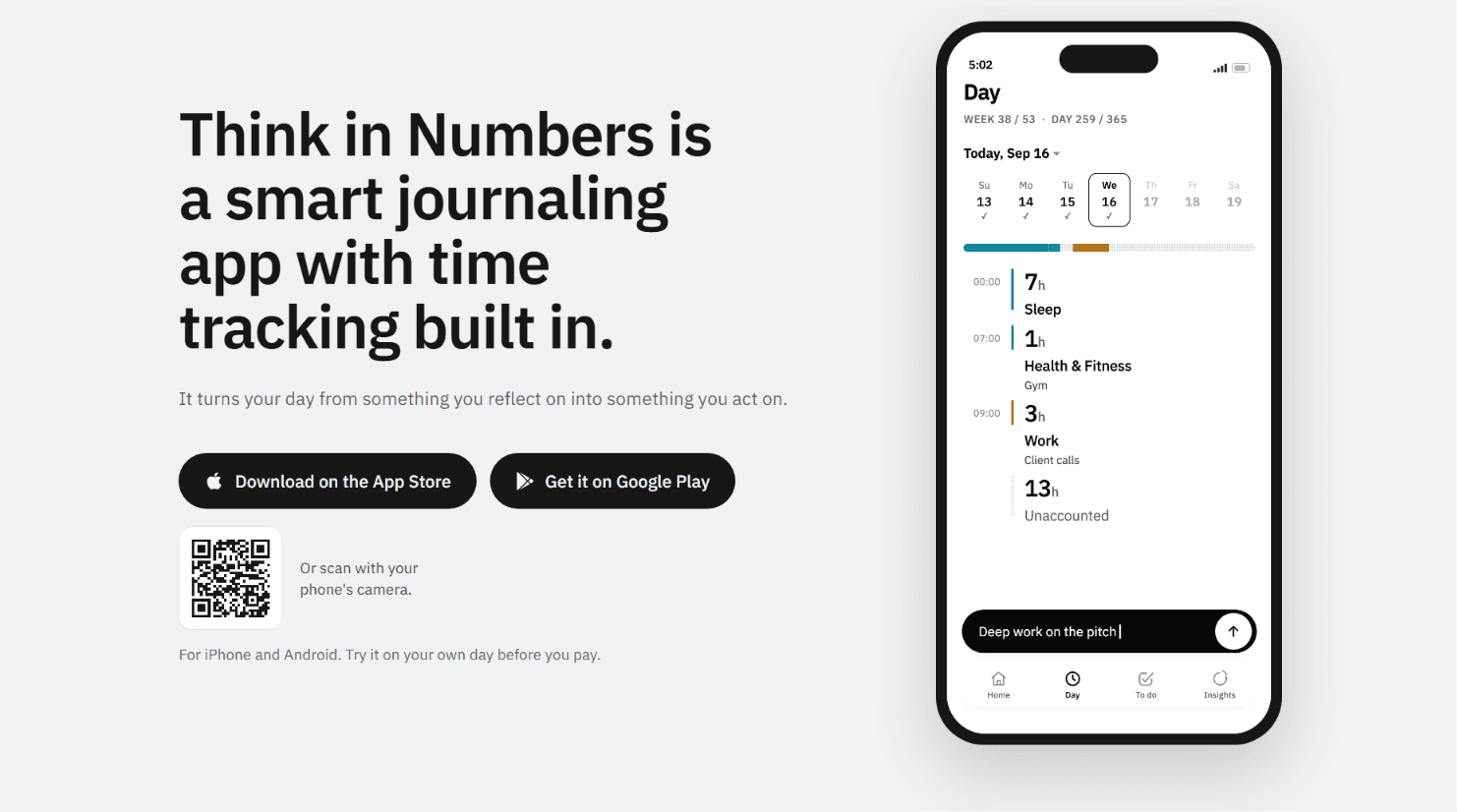
Think in Numbers takes a different approach by combining journaling with time tracking. Instead of manually recording every activity, users can write or speak about their day in natural language. The app turns those entries into estimated time blocks, organizes the hours into categories, and highlights time that was not accounted for.
Available for iPhone and Android, Think in Numbers is designed for people who want to understand their daily routines, improve time management, and make more deliberate decisions about how they spend their hours.
What Is Think in Numbers?
Think in Numbers is a smart journaling and personal time management app that transforms everyday reflections into a clearer picture of how time is spent. Users describe their activities in their own words, either by typing or speaking, and the app interprets those descriptions to organize time into categories such as work, sleep, health and fitness, family and friends, and phone usage.
For example, someone might write, "Deep work from 9 AM to 1 PM, meetings until 5, gym from 6 to 7, and dinner with friends at 8." Think in Numbers can turn that entry into structured time records instead of requiring the user to start and stop a timer for every activity.
The app also identifies the hours that were not mentioned in the journal. These appear as unaccounted time, making gaps in the daily record more visible.
Over time, users can review their activity patterns across days and weeks. This makes it easier to compare how they planned to spend their time with what their journal actually records.
The main idea is simple: journaling helps you reflect on your day, while time tracking helps you understand it. Think in Numbers combines both in a single workflow.
Why Traditional Time Tracking and Journaling Often Fall Short
Time management tools often depend on consistent manual input. A user needs to remember to start a timer, switch activities, stop tracking, and categorize the time correctly. Missing a few entries can make the resulting report less useful, especially when workdays involve frequent interruptions.
Spreadsheets and timesheets create a similar challenge. Although they can record detailed information, maintaining them requires regular effort. People who want a lightweight personal tracking system may find this process too demanding to sustain.
Journaling has a different limitation. Writing about what happened during the day can improve reflection, but a narrative does not automatically reveal how many hours went into work, sleep, exercise, relationships, or phone use.
Think in Numbers bridges these approaches by allowing users to begin with a familiar activity: describing their day. It then turns those descriptions into structured time information that can be reviewed later.
This approach may suit students, founders, creators, and professionals who want more awareness of their routines without maintaining a separate timer for every task.
Key Features of Think in Numbers
1. Natural Language Time Tracking Without Timers
One of the defining features of Think in Numbers is its ability to interpret daily activities written in ordinary language. Users do not need to translate every activity into a formal timesheet before recording it.
An entry such as "Studied for the exam from 3 to 4:30 PM" can become a 90-minute activity. Similarly, "Called home from 7:30 to 9 PM" can be recorded as time spent with family and friends.
This makes the tracking process more flexible because people can describe their day in a way that feels natural. They can record their activities in one entry or add information throughout the day, depending on their preference.
The result is a structured view of daily activities created from written or spoken reflections, rather than a collection of manually operated timers.
2. Automatic Time Categorization
Recording an activity is only part of understanding a daily routine. Users also need to see how their time is distributed across different areas of life.
Think in Numbers organizes recorded activities into categories such as work, sleep, health and fitness, family and friends, and phone usage. The app's broader category examples also include faith and self-growth.
This categorization can reveal patterns that are difficult to notice when reading journal entries individually. For instance, a person may believe they spend most of their free time exercising and meeting friends, only to discover that phone usage accounts for a larger share than expected.
The categories provide a more structured way to examine personal routines and identify areas where a change might be useful.
3. Unaccounted Time for Finding Missing Hours
A particularly useful feature is the app's treatment of unaccounted time. Rather than presenting only the activities a user has recorded, Think in Numbers makes the difference between mentioned time and the full day visible.
Suppose someone records eight hours of work, seven and a half hours of sleep, two hours with friends, and one hour at the gym. The app can show those categories alongside the remaining time that was not described.
This distinction matters because incomplete tracking can otherwise create a misleading picture of productivity. A user might record several meaningful activities without realizing how much of the day remains unexplained.
Unaccounted time does not automatically mean that those hours were wasted. Some may involve ordinary tasks, travel, breaks, or activities the user simply forgot to mention. Its purpose is to highlight gaps that users can investigate if they want a more complete understanding of their day.
4. Voice Journaling and Flexible Daily Entries
Writing detailed journal entries is not always convenient. After a long workday, typing everything that happened may feel like too much effort.
Think in Numbers allows users to record their day by speaking or typing. This flexibility makes it possible to describe activities in a conversational way without completing a separate form for each one.
Users can also record their day in multiple entries instead of waiting until the evening. Someone might log a morning workout, add their work schedule later, and describe their evening activities before going to bed.
The goal is to make time tracking fit naturally into an existing routine. By reducing the need for manual time entry, the app aims to make consistent reflection easier.
5. Daily and Weekly Productivity Insights
Individual entries provide useful information, but patterns become more meaningful when viewed over time.
Think in Numbers helps users examine how their hours are distributed across days, weeks, and months. These records can make recurring habits easier to recognize, such as consistently sleeping less than intended, spending more time on the phone than planned, or struggling to protect time for exercise.
The app also supports setting targets for important areas of life and comparing those targets with recorded activities.
For example, someone who wants to dedicate more time to personal development could establish a target and review whether their actual weekly routine reflects that intention. If the target is repeatedly missed, they can consider changing their schedule rather than relying entirely on motivation.
These insights are most useful when treated as feedback for future decisions, not as a score that determines whether a day was successful.
6. Goals, To-Dos, Habits, and Reminders
Time awareness becomes more actionable when it connects to specific goals. Think in Numbers includes to-dos, habits, reminders, streaks, and weekly planning features.
These tools can help users connect their daily activities to broader priorities. Instead of simply recording that they spent time studying or exercising, they can establish habits and review their progress.
Weekly targets provide another way to evaluate whether time is being allocated according to personal priorities. Someone might want to increase exercise time, establish a more consistent sleep routine, or reserve more hours for focused work.
The important difference is that the app can compare intentions with the time recorded in a user's journal. This gives users a practical reference for adjusting their plans.
7. Zeno, the App's Assistant
Think in Numbers also includes Zeno, an assistant that users can interact with by typing or speaking. According to the product description, Zeno can help users log time, change a time block, or mark a to-do as complete.
This provides an additional way to manage recorded activities without navigating every task manually. For example, a user may need to correct an activity or update a task after their plans change.
The assistant fits into the app's broader goal of making time management easier to maintain. Rather than requiring users to interact with a traditional tracker for every adjustment, it offers a conversational method for managing parts of their daily record.
8. Reflective Journaling and Personal Awareness
Although time tracking is central to Think in Numbers, the app is not limited to recording hours. It also supports reflective journaling, including morning and evening reflections with daily prompts.
This allows users to consider both what happened and how they experienced it. A day can contain several hours of productive work while still feeling stressful or unbalanced. Similarly, a day with fewer completed tasks might include meaningful time with family or activities that support personal well-being.
Combining reflection with time records offers a broader perspective than tracking hours alone. Users can examine their routines while retaining the personal context that makes journaling valuable.
How Think in Numbers Works
Think in Numbers is designed around a simple process that begins with describing your day.
Step 1: Write or speak about your activities. Record your day in your own words. You can mention approximate or specific times, such as when you woke up, started working, exercised, or went to bed.
Step 2: Let the app organize the information. Think in Numbers interprets the entry and turns the activities it recognizes into time blocks and categories. You do not need to start a timer every time you move to a different task.
Step 3: Review your recorded hours. Examine the time assigned to work, sleep, fitness, relationships, and other categories. Check the unaccounted portion to see whether you left out activities.
Step 4: Look for patterns. As you record more days, review how your routine changes over time. Compare your recorded hours with the targets you have set.
Step 5: Adjust your next week. Use the information to make practical changes. You might reserve more time for focused work, reduce late-night phone use, or make your sleep schedule more consistent.
The process turns daily journaling into a repeatable feedback loop: record, review, understand, and adjust.
Who Should Use Think in Numbers?
Think in Numbers is intended for people who want to understand their routines without the burden of traditional time tracking.
Students can use it to review time spent studying, attending classes, exercising, sleeping, and using their phones. This can help them understand whether their daily routines reflect their academic priorities.
Founders and entrepreneurs can examine how much time goes into focused work, meetings, administration, personal activities, and rest. For people managing multiple responsibilities, this information may help identify where their schedules need adjustment.
Content creators and freelancers can use daily entries to review their work patterns and see how much time is allocated to production, communication, learning, and personal commitments.
Professionals may find it useful when they want to improve their work-life balance or understand why their days feel busy despite limited progress on important tasks.
People who struggle with conventional trackers may appreciate the option to describe activities in natural language rather than maintain a running timesheet.
The app is not limited to people trying to maximize productivity. It can also help users understand whether they are making enough room for sleep, health, relationships, and other personal priorities.
Think in Numbers vs. Traditional Time Tracking Apps
Traditional time trackers commonly focus on recording work sessions, managing project hours, or measuring time spent on specific tasks. Journaling apps, by contrast, focus primarily on written reflections and personal experiences.
Think in Numbers combines aspects of both approaches. Its main differentiator is the use of natural language entries to create structured time records while retaining a journal of the day.
This makes it a different option for users who do not want to manage a separate tracker and journal. It also gives unaccounted time a visible place in the daily record, helping users distinguish between activities they described and hours that remain unexplained.
However, the right tool depends on the user's needs. Someone who requires detailed billable-hour reports for client invoices may prefer a dedicated professional time tracker. Someone who wants long-form diary entries without activity categorization may prefer a conventional journaling app.
Think in Numbers is most relevant to users who want personal reflection and time awareness to work together.
Is Think in Numbers Worth Trying?
Think in Numbers offers an approachable alternative to manually tracking every activity throughout the day. Its combination of natural language journaling, automatic time categorization, unaccounted-hour visibility, and weekly targets addresses a common problem: understanding where time actually goes without creating a complicated tracking routine.
The app's voice input, reflective prompts, to-dos, habits, and Zeno assistant add flexibility for people with different preferences. Over time, recorded entries can provide a useful basis for reviewing daily habits and deciding what to change.
There are also practical limitations to consider. The insights depend on the activities users record and how accurately the app interprets their descriptions. Unaccounted hours may reflect missing entries rather than wasted time, and the resulting records should be reviewed rather than treated as a perfect measurement of every minute.
For users who want a clearer picture of their daily routines, these trade-offs may be reasonable. The best way to evaluate the app is to record a typical day and see whether its time breakdown reveals patterns worth acting on.
If you want to combine personal journaling with a clearer view of your daily hours, explore Think in Numbers and try it on your own day before paying.
Frequently Asked Questions
1. What is Think in Numbers?
Think in Numbers is a smart journaling app with built-in time tracking. Users write or speak about their day, and the app turns the activities they describe into time records organized by category.
2. Is Think in Numbers a journaling app or a time tracker?
It combines both. The app preserves daily reflection while also showing how recorded time is distributed across activities such as work, sleep, fitness, family, and phone usage.
3. Do I need to start timers throughout the day?
No. The app is designed around natural language entries, so users can describe their activities instead of manually starting and stopping timers for each task.
4. What does unaccounted time mean in Think in Numbers?
Unaccounted time is the portion of the day that has not been explained by the activities recorded in the journal. It helps users notice gaps in their records, although those hours are not necessarily wasted.
5. Can I use Think in Numbers with my voice?
Yes. The app supports spoken as well as typed entries, allowing users to describe their day in their own words.
6. Does Think in Numbers support goals and habits?
Yes. Its features include to-dos, habits, reminders, streaks, targets, and weekly planning. These tools help users compare their intended routines with their recorded activities.
7. Is Think in Numbers available on iPhone and Android?
Yes. Think in Numbers is available for both iOS and Android devices.
8. Who is Think in Numbers best for?
It may be useful for students, founders, creators, professionals, and anyone who wants to understand their daily routines without maintaining spreadsheets or traditional timers.