Developer Tools
SendBunny: Self-Hosted Email Marketing and Transactional Email Platform for Developers
Discover SendBunny, a self-hosted email platform on AWS for transactional emails, marketing campaigns, automations, analytics, and AI agents through MCP.
CodeHype13 min read
Email remains essential for SaaS products and online businesses. Applications use it to send verification codes, password resets, receipts, and account notifications, while marketing teams rely on campaigns, newsletters, onboarding sequences, and customer re-engagement emails.
The challenge is that managing these workflows through hosted email platforms can become expensive as a business grows. Contact-based pricing, recurring platform fees, vendor dependencies, and separate tools for transactional and marketing email can add complexity to an otherwise straightforward process.
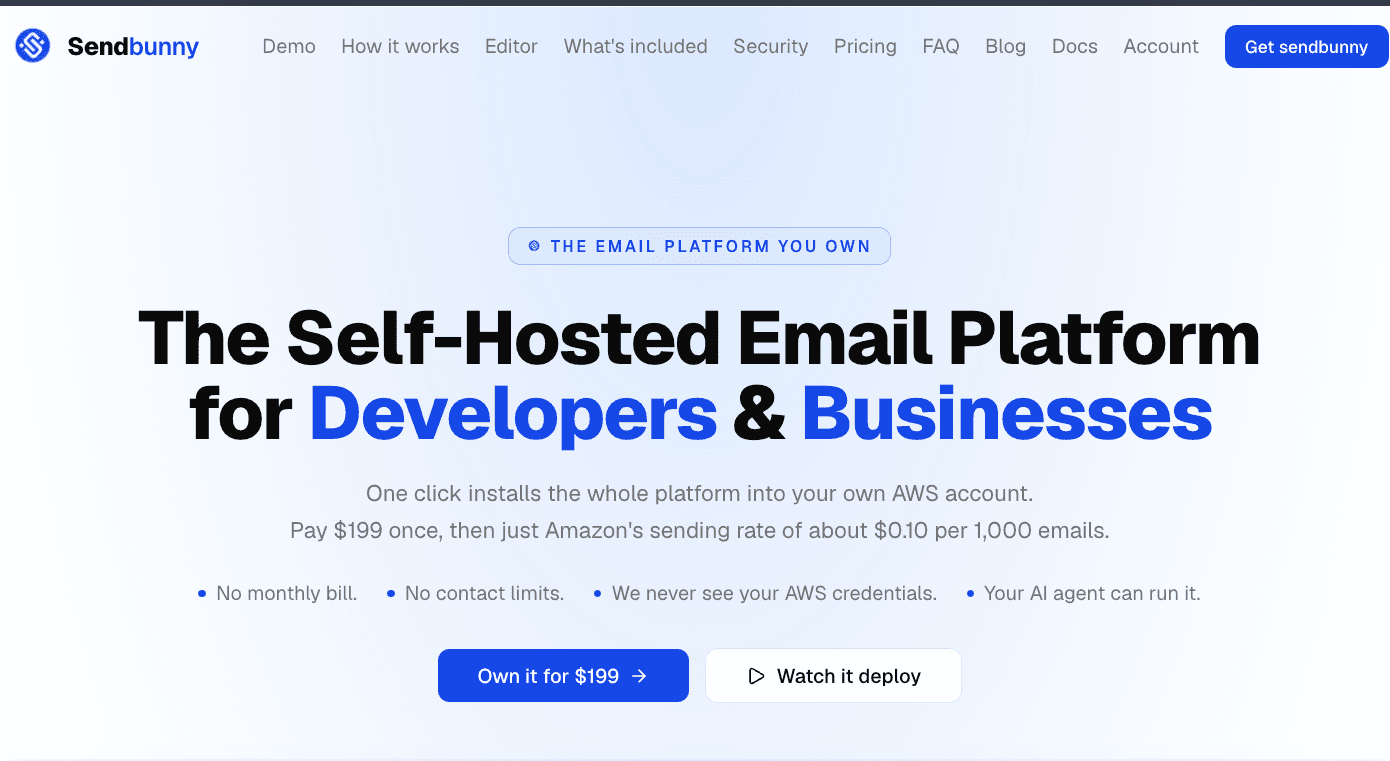
SendBunny takes a different approach. It is a self-hosted email platform that deploys directly into your own AWS account and uses Amazon Simple Email Service (Amazon SES) for email delivery. It combines transactional email APIs, marketing campaigns, automations, contact management, analytics, templates, and an inbox in one installation.
It also supports MCP, allowing compatible AI agents to interact with email operations through a permission-controlled tool interface.
You can explore SendBunny to see how it works and whether owning your email infrastructure makes sense for your business.
What Is SendBunny?
SendBunny is an AWS-native, self-hosted email marketing and transactional email platform designed for developers, startups, founders, and businesses that want greater control over their email infrastructure.
Instead of running the entire service through a third-party provider's hosted application, SendBunny installs into your own AWS account. Amazon SES handles email delivery, while SendBunny provides the application layer needed to manage campaigns, contacts, templates, sending domains, automations, analytics, and transactional messages.
This approach combines the delivery infrastructure of Amazon SES with the convenience of a more complete email marketing platform.
SendBunny is particularly relevant to businesses already using AWS or Amazon SES, as well as teams looking for alternatives to hosted email services such as Resend, SendGrid, Mailgun, Sendy, and Mailchimp.
Self-Hosted Email Marketing Software on AWS
The defining feature of SendBunny is that the platform runs inside your own AWS account.
With a conventional hosted email service, your email management application and contact data are generally handled through the provider's infrastructure. With SendBunny, the application is deployed into infrastructure controlled through your AWS account.
This gives businesses more direct control over their email platform and the data it manages.
The installation uses a CloudFormation stack containing six resources, according to SendBunny's documentation. The process is designed to be completed through the AWS console without manually writing terminal commands or YAML configuration. The website estimates that installation takes around ten minutes.
After deployment, users access their own dashboard through a dedicated URL.
For startups that want a self-hosted email platform without building an entire email management application from scratch, this is a central part of SendBunny's appeal.
Transactional Email API for SaaS Applications
Transactional emails are messages triggered by events within an application.
Common examples include account verification emails, password resets, order confirmations, receipts, billing notifications, and security alerts. These messages are usually generated automatically when a user or system performs a particular action.
SendBunny includes a transactional email API designed to connect application workflows with email delivery.
Developers can send messages through an HTTP request, use stored templates, and populate them with dynamic data. Webhooks are also included to support integrations with other systems.
This makes SendBunny relevant to SaaS founders who need transactional email infrastructure alongside a broader marketing email workflow.
Rather than maintaining separate tools for application-generated messages and marketing campaigns, a business can manage both through the same self-hosted installation.
Email Marketing Campaigns Without Contact-Based Platform Pricing
Many email marketing services charge according to subscriber counts, sending volume, or subscription tiers. As contact lists grow, these pricing structures can become a significant operating expense.
SendBunny takes a different approach by providing unlimited contacts and domains under its license, without a recurring SendBunny platform fee after the initial purchase. Email delivery is billed separately through Amazon SES.
The platform includes tools for creating and sending marketing campaigns, managing audiences, importing contacts, and reviewing campaign performance.
Its editor supports branded emails, images, product cards, promotional codes, merge tags, and reusable templates. Users can compose messages through a visual editor or switch to raw HTML when they need more control over the design.
For startups and businesses with growing subscriber lists, a self-hosted email marketing platform can provide an alternative to recurring contact-based software pricing.
However, unlimited contacts do not mean unlimited delivery capacity under every circumstance. Amazon SES account quotas, sending rates, verification requirements, and deliverability policies still apply.
AI Email Automation Through MCP
One of SendBunny's distinguishing features is its MCP server for AI agents.
Model Context Protocol, or MCP, provides a way for compatible AI applications to interact with external tools. SendBunny uses MCP to let supported coding assistants and AI agents perform email management tasks through a permission-controlled connection.
The platform lists compatibility with tools including Claude Code, Claude Desktop, Codex, Cursor, and VS Code.
According to its documentation, the MCP integration includes 158 tools covering campaigns, automations, segments, contacts, imports, forms, templates, inbox operations, webhooks, and settings.
This means an AI agent can do more than generate email copy. Depending on the permissions granted, it can help create audience segments, prepare templates, configure campaigns, send test messages, and schedule marketing activities.
For example, a founder could ask a connected agent to identify subscribers who have not opened recent emails, prepare a re-engagement campaign, send a test message, and schedule the campaign after reviewing the proposed changes.
The agent can interact with the same platform used through the dashboard, while the user retains control over the actions it is allowed to perform.
Permission Controls for AI Email Agents
Giving an AI agent access to email infrastructure requires careful control. A tool that can read contacts and create campaigns may also have access to operations that change data or send messages.
SendBunny provides permission settings that let users choose the level of access for an agent. The available modes include Send mail, Inbox, and Full, configurable for each sending domain.
The platform also distinguishes between read, change, and delete operations. Its documentation states that tools identify the type of action involved, helping an assistant recognize when confirmation may be required.
Agent activity appears in the dashboard and activity log, and users can disconnect an agent through the API key settings.
These controls are important for teams that want AI-assisted email operations without giving every agent unrestricted access to their entire email system.
As with any automation, users should test workflows carefully and grant only the permissions needed for the intended task.
Email Automations, Segmentation and Sign-Up Forms
A complete email marketing workflow requires more than sending individual campaigns. Businesses often need automated sequences, targeted audiences, and ways to collect new subscribers.
SendBunny includes automation and audience management features as part of its standard installation.
Users can create sequences such as welcome emails, onboarding campaigns, trial reminders, and win-back messages. Automations can be triggered when someone joins a list, when a date arrives, or when an application event occurs.
Conditional branches and A/B testing help users create different paths for different audience groups.
The platform also supports contact segments, sign-up forms, subscription topics, double opt-in, and CSV imports. Form protection and sending controls are included to help manage subscriber acquisition and reduce the risk of poor-quality addresses affecting deliverability.
For businesses looking for email automation software without multiple subscription tiers, SendBunny brings these capabilities into one self-hosted platform.
Email Templates and a Flexible Editor
Creating consistent branded emails can be difficult when teams rely on separate editors for campaigns, transactional messages, and replies.
SendBunny uses a shared editor across its email workflows. Users can create campaigns, edit templates, and compose inbox replies without learning a different interface for each task.
The editor supports slash commands, a live preview, merge tags, and a raw HTML mode.
The visual editing workflow is designed for people who want to format content without writing HTML, while the raw HTML option provides more control for developers and marketers who need precise layouts.
Reusable templates also help businesses maintain consistent branding across transactional emails and marketing campaigns.
Email Analytics and Deliverability Monitoring
Sending emails is only part of the process. Businesses also need to understand how campaigns perform and whether their messages are being delivered successfully.
SendBunny includes an analytics dashboard with sending statistics and campaign engagement metrics. Users can review delivery information, opens, clicks, bounces, complaints, unsubscribes, and suppressed contacts.
The platform also provides campaign reporting down to individual recipients, helping teams inspect the activity associated with particular messages.
Deliverability monitoring can help identify potential problems, but email placement still depends on factors such as domain authentication, sending reputation, recipient engagement, message content, and Amazon SES account status.
SendBunny provides the management layer for monitoring these signals, while users remain responsible for maintaining compliant lists and following good sending practices.
A Team Inbox for Sending and Receiving Email
Marketing campaigns and transactional APIs are not always enough for businesses that need to handle incoming replies.
SendBunny includes an inbox where replies can be threaded for team handling at the user's own domain.
This connects outbound email with the conversations that follow. A business can send a campaign, receive responses, and manage those replies through the same platform.
For teams that handle customer communications alongside automated emails, this can reduce the need to maintain separate systems for sending and receiving messages.
Unlimited Contacts and Sending Domains
SendBunny's license includes unlimited contacts and sending domains. This is relevant for businesses managing several brands, products, or application environments.
A SaaS company, for example, may need different sending domains for separate products or distinct email workflows. An agency may manage multiple client brands, while a growing business may separate transactional email from marketing campaigns.
The platform is designed to support these setups within one installation.
Actual sending capacity remains subject to AWS quotas, account configuration, and the operational limits of the chosen infrastructure. Users should consider these requirements before planning high-volume campaigns.
SendBunny Pricing: One-Time License and AWS Usage
SendBunny uses a one-time license model rather than charging a recurring platform subscription by default.
- $199 one-time license: Deploy the email platform into your own AWS account, with unlimited contacts and domains.
- $99/year optional ongoing maintenance: Provides updates, bug fixes, security patches, and new features while active.
- About $0.10 per 1,000 emails: Indicative Amazon SES sending cost, billed directly by AWS. Actual charges can vary with usage and additional services.
The platform continues working after the initial purchase even if the maintenance subscription is not renewed. However, users without active maintenance do not receive future updates, bug fixes, security patches, or new features.
AWS infrastructure and email delivery are separate from the SendBunny license. Buyers should account for these costs and ensure that Amazon SES is configured and approved for their intended sending volume.
SendBunny vs Hosted Email Platforms
SendBunny is designed for businesses that prefer owning their email management application rather than renting access to a fully hosted platform.
Hosted services such as Resend, SendGrid, Mailgun, and Mailchimp can offer managed infrastructure and straightforward onboarding. Depending on the service, they may also reduce the operational work involved in account configuration, maintenance, and deliverability management.
SendBunny prioritizes infrastructure ownership and a one-time platform license, while using Amazon SES for delivery.
The differences are important:
- Infrastructure: SendBunny deploys into your AWS account rather than running as a conventional hosted email application.
- Pricing: The platform uses a one-time license, with AWS usage billed separately.
- Data control: Contact data and application data remain within your AWS environment.
- Email functionality: Transactional APIs, marketing campaigns, automations, templates, analytics, and an inbox are included.
- AI integration: MCP lets compatible agents interact with email operations using configurable permissions.
- Maintenance: You retain the deployed version, while continued updates require an active maintenance subscription.
This model can suit technically comfortable businesses that value control and predictable platform costs. A hosted service may remain more convenient for teams that prefer someone else to manage the application infrastructure.
Who Should Use SendBunny?
SendBunny is most relevant to teams that want a complete email platform while retaining control of their AWS environment.
SaaS founders can use it for account verification, password resets, product notifications, onboarding sequences, and customer newsletters.
Developers can integrate transactional email into applications through the API and use stored templates and webhooks.
Marketing teams can manage campaigns, segments, automations, contact imports, and engagement reporting.
AWS users can build on infrastructure they already use rather than adding another hosted platform dependency.
AI-first startups can connect compatible agents to email workflows through MCP, with permissions governing what those agents can do.
Is SendBunny Worth It?
SendBunny's value depends on how much email your business sends, how much control you want over infrastructure, and whether you need both transactional and marketing email.
The one-time license can be appealing for teams that expect to use the platform for several years and want to avoid recurring email software fees tied to contacts. MCP support also provides a way to integrate AI agents into email operations beyond basic message generation.
However, self-hosting is not the same as having no operational responsibility. Users still need an AWS account, a properly configured Amazon SES setup, domain authentication, and attention to deliverability, security, and backups.
The product is therefore best suited to businesses that value infrastructure ownership and are comfortable managing an AWS-based service, even though the installation process is designed to avoid manual command-line configuration.
Final Thoughts
SendBunny combines transactional email, marketing campaigns, automation, contact management, analytics, and an inbox in a self-hosted platform deployed to your own AWS account.
Its one-time license model offers an alternative to recurring hosted email platform fees, while Amazon SES handles email delivery. MCP support adds another dimension by allowing compatible AI agents to manage campaigns, segments, templates, and other email operations through controlled permissions.
For startups, developers, and businesses already using AWS, SendBunny is worth considering if owning the email platform and keeping its data within your infrastructure are important priorities.
You can visit SendBunny to explore the platform, review the installation process, and check its current pricing.
Frequently Asked Questions
What is SendBunny?
SendBunny is a self-hosted email platform for transactional and marketing email. It deploys into your AWS account and uses Amazon SES for delivery while providing campaigns, automations, contacts, templates, analytics, and an inbox.
Is SendBunny an alternative to Resend or SendGrid?
Yes. SendBunny is positioned as a self-hosted alternative to hosted email platforms, including Resend, SendGrid, and Mailgun. The main distinction is that it runs in your AWS account rather than operating as a conventional hosted email management service.
Does SendBunny support transactional emails?
Yes. It includes a transactional email API for sending messages such as receipts, password resets, alerts, and other application-triggered emails.
Can SendBunny handle email marketing campaigns?
Yes. The platform includes campaign creation, templates, audience management, segmentation, automation, analytics, and subscription management features.
Does SendBunny support AI agents?
Yes. SendBunny provides an MCP server that supports compatible tools such as Claude Code, Claude Desktop, Codex, Cursor, and VS Code. The available tools cover many email management operations, subject to the permissions configured by the user.
How much does SendBunny cost?
The listed license price is $199 as a one-time payment. Optional maintenance costs $99 per year. Amazon SES usage is billed separately by AWS, with the website citing an approximate rate of $0.10 per 1,000 emails.
Do I need AWS experience to install SendBunny?
The product is designed to simplify installation through a preconfigured AWS CloudFormation stack. Its website says the process does not require terminal commands or manual YAML editing, although users still need an AWS account and must understand the responsibilities of operating the deployed service.
What happens if I do not renew maintenance?
Your deployed version continues working while your AWS account remains active. You will no longer receive future updates, bug fixes, security patches, or new features unless you renew the maintenance subscription.
Does SendBunny limit contacts or sending domains?
The license includes unlimited contacts and sending domains. Actual email sending remains subject to Amazon SES quotas, configuration, and applicable AWS limits.
Is SendBunny completely free after the initial purchase?
No. The platform has a one-time license fee, and Amazon SES charges for email delivery. Ongoing maintenance is optional but required to continue receiving updates, bug fixes, security patches, and new features.
Who is SendBunny best suited for?
SendBunny is especially relevant to SaaS startups, developers, founders, marketers, and AWS-based businesses that want to manage transactional and marketing email in their own infrastructure rather than rely entirely on a hosted email platform.