AI Tools
Vinaa: One AI Chat App for Cloud and Local Models on Mac
Discover Vinaa, a native Mac AI chat app that combines cloud and local models, organized conversations, file attachments, and privacy controls.
CodeHype3 min read
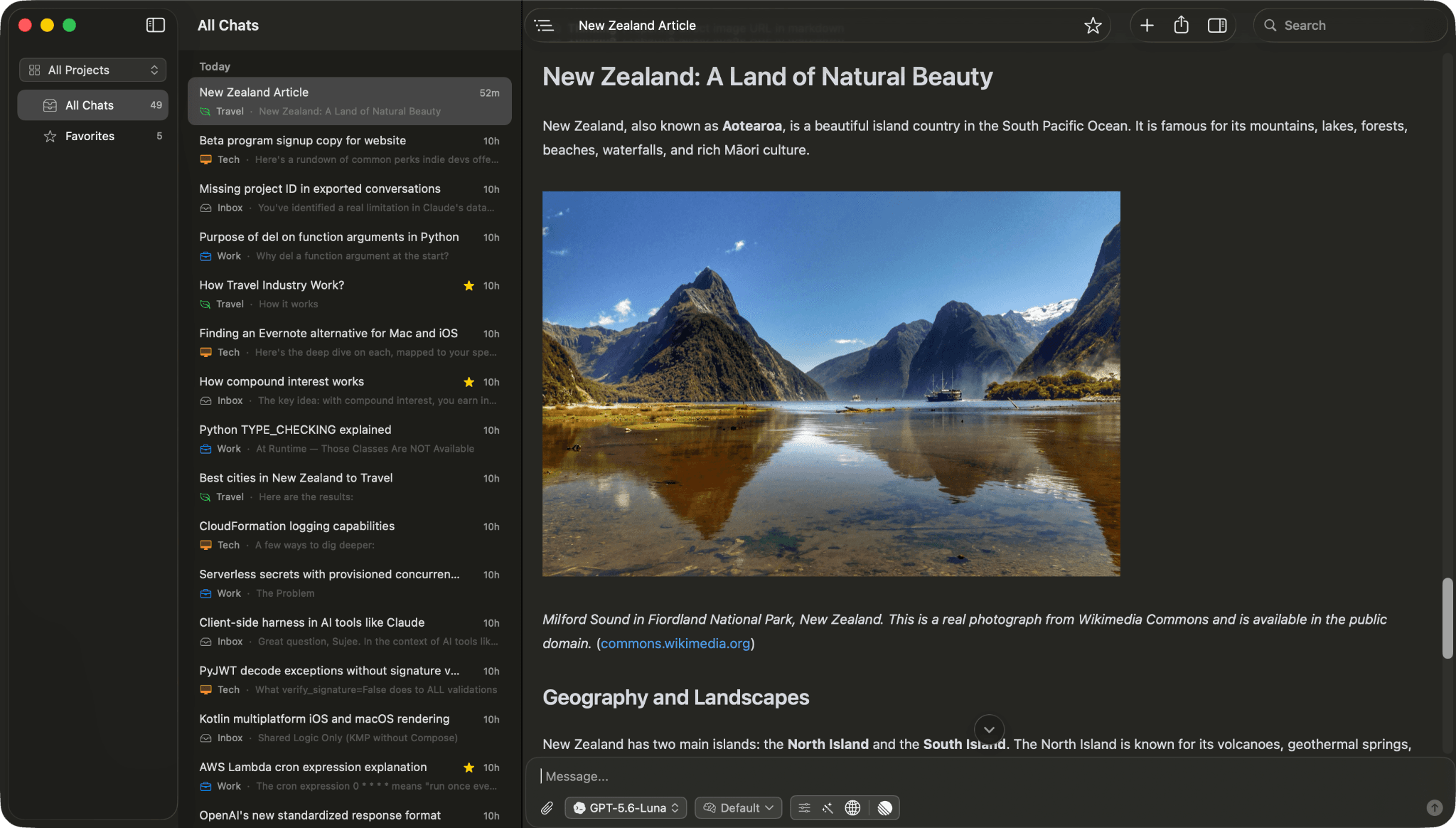
What Is Vinaa?
Working with multiple AI tools can quickly become messy. Conversations get scattered across platforms, useful answers become difficult to find, and switching models interrupts your workflow.
Vinaa solves this by bringing cloud and local AI models into one organized, native macOS application. Users can connect AI providers with their own API keys, run local models through Ollama or LM Studio, and manage conversations in a single workspace.
With Vinaa, you can organize chats, import existing ChatGPT and Claude conversations, reuse prompts, and switch models without starting a new conversation.
Key Features of Vinaa
1. Cloud and Local AI Models
Access supported providers, including OpenAI, Anthropic, Google, Mistral AI, DeepSeek, and OpenRouter. You can also connect local models through Ollama and LM Studio.
2. Bring Your Own API Keys
Connect supported providers using your own API keys and choose models according to your needs.
3. Organized Conversations
Group related chats into projects, folders, and nested folders. Search your conversation history to find previous answers more easily.
4. Import ChatGPT and Claude Chats
Bring existing conversations into Vinaa and export chats whenever you choose, making it easier to keep your AI work organized.
5. File Attachments and Prompt Templates
Add files to conversations, reuse previously attached files, and save frequently used prompts with customizable placeholders.
6. Multiple Windows and Tabs
Keep several conversations open simultaneously and move between projects without losing your place.
7. Web Search and MCP Integration
Use supported provider tools, including web search, and connect external services through the Model Context Protocol (MCP).
Is Vinaa Private?
Vinaa stores conversations locally on your Mac and offers optional synchronization through your private iCloud account. API keys are protected using macOS Keychain.
According to its website, Vinaa does not use your prompts, files, or responses to train AI models. However, cloud providers process requests under their own policies, so review the relevant provider's privacy terms.
Vinaa Pricing and Compatibility
Vinaa offers a beta download and advertises access for $20. It requires macOS 15 or later and supports both Intel and Apple silicon Macs.
Who Should Use Vinaa?
Vinaa is useful for developers, researchers, students, writers, founders, and other Mac users who regularly work with multiple AI models. It is particularly relevant for people who want local model support alongside cloud AI services.
Final Verdict
Vinaa brings AI conversations, files, prompts, and tools together in a native Mac workspace. Its combination of local model support, project organization, conversation imports, and privacy-focused storage makes it worth exploring for users who want more control over their AI workflow.
If you use several AI providers and want a more organized desktop experience, visit Vinaa to explore its features.
Frequently Asked Questions
What is Vinaa?
Vinaa is a native macOS application for chatting with cloud and local AI models in one workspace.
Does Vinaa support local AI?
Yes. It supports local models through Ollama and LM Studio.
Can I import ChatGPT conversations?
Yes. Vinaa supports importing conversations from ChatGPT and Claude.
Does Vinaa require a Mac?
Yes. It requires macOS 15 or later and supports Intel and Apple silicon Macs.