AI Tools
Design.com AI Image Generator: Turn Text Prompts Into Unique Visuals
Discover Design.com AI Image Generator, a free AI image generator that turns text prompts into unique visuals for websites, social media, branding, and marketing.
CodeHype6 min read
Creating high-quality visuals for social media, websites, advertisements, and marketing campaigns can take time, especially if you lack professional design skills. Searching through stock image libraries does not always produce the exact image you have in mind, while creating custom graphics from scratch can require additional tools and experience.
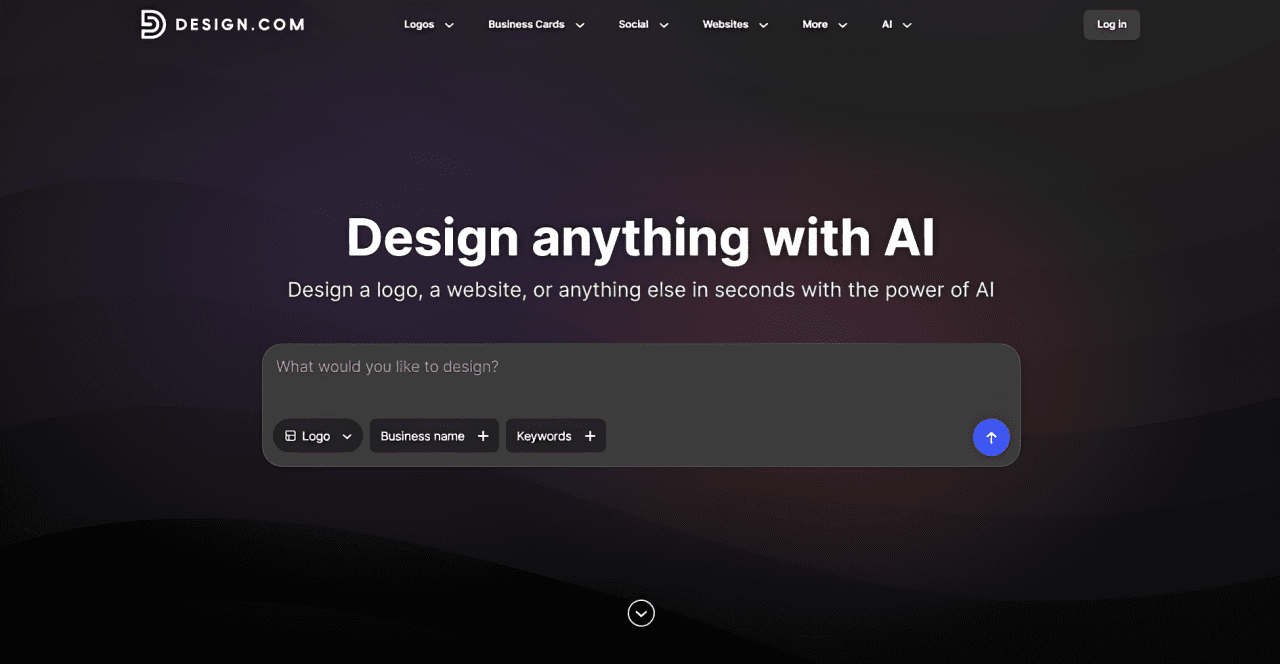
The Design.com AI Image Generator offers a simpler way to bring creative ideas to life. By describing an image in everyday language, users can generate original visuals based on their preferred subjects, backgrounds, colors, lighting, composition, and artistic styles.
Whether you are a content creator planning your next social media post, a startup founder creating marketing materials, or a designer exploring new concepts, this tool helps turn written ideas into visual assets.
Try it for yourself at Design.com AI Image Generator.
What Is Design.com AI Image Generator?
Design.com AI Image Generator is a freemium text-to-image AI tool that transforms written prompts into images. It supports a variety of creative directions, including realistic scenes, illustrations, product concepts, abstract artwork, and other visual styles.
Instead of relying entirely on existing stock photos, users can describe what they want to see and generate multiple image options. They can then refine their prompts to explore different compositions, moods, colors, and creative interpretations.
One of its biggest advantages is its connection to the wider Design.com platform, which includes more than 50 AI and design tools and over 651,000 templates. This allows users to move beyond image generation and incorporate their visuals into complete marketing and branding materials.
Key Features of Design.com AI Image Generator
1. Generate Images From Simple Text Prompts
You do not need advanced design or AI knowledge to get started. Simply describe your idea, including the subject and setting, and let the AI generate images inspired by your prompt.
For example, you could describe a futuristic workspace with soft lighting, a product displayed against a minimal background, or an illustration for a technology blog.
2. Customize Image Styles and Details
The quality of an AI-generated image often depends on how clearly you communicate your idea. Design.com lets you specify details such as lighting, background, colors, mood, subject, and composition.
This gives you more control over the final result and helps you experiment with different visual directions until you find an image that fits your project.
3. Explore Multiple Image Variations
Sometimes the first generated image does not match your expectations. Design.com allows users to explore different image options and refine their prompts to generate alternative interpretations.
Changing a few words, adjusting the visual style, or describing a different background can help you discover creative possibilities that were not obvious at the beginning.
4. Create Images for Marketing and Social Media
The tool can generate visuals for a wide range of use cases, including Instagram posts, YouTube content, LinkedIn graphics, blog illustrations, advertisements, presentations, and website banners.
This makes it particularly useful for marketers and content creators who regularly need fresh visual assets for different platforms.
5. Turn Generated Images Into Complete Designs
Design.com goes beyond standalone AI image creation. Users can incorporate generated visuals into marketing materials such as posters, business cards, social media graphics, and presentations.
You can also work with brand elements such as logos, colors, and typography through the platform's broader design tools. This integrated workflow can help businesses create more consistent branded content without constantly switching between different applications.
How to Use Design.com AI Image Generator
Getting started is straightforward:
- Write your prompt: Describe the image you want to create.
- Add visual details: Specify the subject, background, lighting, colors, mood, and style.
- Generate images: Submit your prompt and explore the available results.
- Choose your favorite: Select the image that best matches your creative vision.
- Refine the result: Adjust your prompt and generate again if you want a different outcome.
- Download and use: Save your chosen image for your website, social media, presentation, or marketing project.
For better results, use descriptive prompts instead of broad instructions. For example, rather than writing "technology background," describe a futuristic technology background with glowing blue lines, a dark minimal setting, and cinematic lighting.
Design.com AI Image Generator Pricing
Design.com AI Image Generator follows a freemium pricing model.
- Free: Users can generate images without creating an account.
- Paid plans: Start at $3 per month when billed annually.
If you plan to use the tool regularly for commercial or client projects, review the current plan details and image usage terms before choosing a subscription.
Who Should Use Design.com AI Image Generator?
This AI image generator can be useful for:
- Content creators who need original visuals for social media, blogs, and videos.
- Startups and entrepreneurs who want to create marketing assets without building a large design budget.
- Digital marketers who need images for advertisements, campaigns, and promotional materials.
- Small businesses looking to create branded graphics and business collateral.
- Designers and freelancers who want to explore visual concepts before finalizing a design.
- Agencies producing creative assets for multiple clients and campaigns.
Is Design.com AI Image Generator Worth Trying?
Design.com AI Image Generator is worth exploring if you want a straightforward way to create custom images from text prompts. Its support for different visual styles, prompt refinement, and multiple image options makes it useful for experimenting with ideas and producing visuals for everyday creative work.
Its strongest advantage is the connection between AI image generation and a broader design platform. Instead of stopping after generating an image, users can continue working on marketing materials and branded graphics using Design.com's other tools and templates.
The free image generation option also makes it easy to test the experience before committing to a paid plan.
If you regularly create website graphics, social media content, or promotional materials, give the Design.com AI Image Generator a try.
Frequently Asked Questions
What is Design.com AI Image Generator?
It is an AI-powered tool that creates original images from text prompts, allowing users to describe subjects, styles, colors, backgrounds, and other visual details.
Is Design.com AI Image Generator free?
Yes. Users can generate images for free without an account. Paid plans start at $3 per month when billed annually.
What types of images can I create?
You can generate realistic scenes, illustrations, product concepts, abstract artwork, website visuals, social media images, and other creative imagery.
Do I need design experience to use it?
No. The tool is designed for users of different skill levels. You can start with a simple description and refine your prompt as needed.
Can I use generated images for marketing?
The tool is designed for marketing and creative projects. Check Design.com's current usage terms and licensing conditions to confirm what is permitted for your intended use.
What makes Design.com different from other AI image generators?
Its main differentiator is its integration with a broader design platform featuring more than 50 AI and design tools and over 651,000 templates, helping users move from image generation to finished marketing materials.