AI Tools
NotchDodo: Turn Your MacBook Notch Into a Dynamic Island
Discover NotchDodo, a Mac productivity tool that turns the MacBook notch into a Dynamic Island with AI usage, music, Pomodoro, calendar, files, notes, and more.
CodeHype7 min read
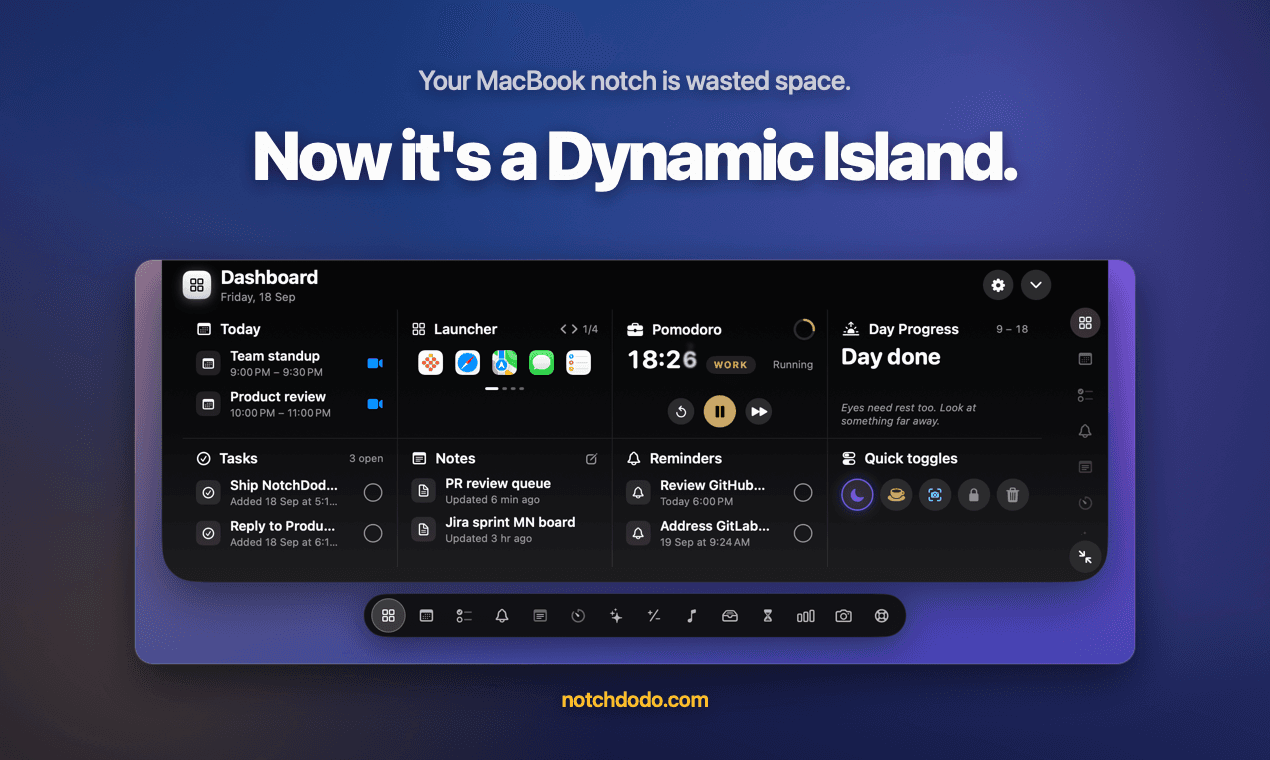
The MacBook notch was designed around the camera and display hardware, but NotchDodo turns that space into something much more useful.
NotchDodo | Make Your MacBook Notch Useful is a Mac productivity tool that transforms the notch into a Dynamic Island-style interface for music, timers, calendar events, files, notes, reminders, system information, and AI coding usage.
Instead of opening separate applications for small tasks, you can hover over the notch and access a compact dashboard containing fourteen different tools.
It is designed for Apple silicon Macs running macOS 14 Sonoma or later. Macs without a physical notch can also use NotchDodo through a simulated black island at the top center of the screen.
What Is NotchDodo?
NotchDodo is a MacBook notch app designed to make the notch useful instead of simply treating it as unused screen space.
The app creates a dark, Dynamic Island for Mac panel that expands when you hover over the notch. From there, you can switch between different productivity tools.
The available tools include:
- Dashboard: Unified control center with status glances
- Pomodoro: Integrated focus and break timers
- AI Usage: Real-time token and spend tracking for AI coding agents
- Today: Day view for calendar events and upcoming meetings
- Reminders: iCloud-synced Apple Reminders integration
- Tasks: Fast, local-first task tracking
- Notes: Instant scratchpad that saves as you type
- Music: Now Playing controls for Apple Music and Spotify
- Shelf: Drag-and-drop temporary staging area for files and downloads
- Calculator: Expression evaluation, unit conversions, and currency rates
- Screen Time: Active application time monitoring
- System Analytics: Live CPU, memory, battery, and network stats
- Mirror: Quick camera check utility
- Support & Feedback: Direct feedback channel
You can also disable tools you do not use, keeping the interface focused on the features that matter to you.
A Dynamic Island for MacBook
One of the main ideas behind NotchDodo is bringing the MacBook Dynamic Island interaction style to macOS.
The notch normally remains black and quiet. When something needs attention, the interface can expand slightly.
For example, it can show:
- Music playback
- A running Pomodoro timer
- A meeting countdown
- Low battery notifications
- Charging status
- AI agent usage
- Download progress
The interface then shrinks back when the information is no longer needed.
This makes NotchDodo feel less like another application window and more like a small information layer sitting above your Mac workflow.
AI Usage Tracking for Claude Code and Codex
One of the more developer-focused features in NotchDodo is AI Usage, serving as a dedicated AI usage tracker for Mac.
The feature reads the local session logs already generated by Claude Code and the Codex CLI. It then presents information such as token usage, estimated cost, five-hour usage windows, burn rate, budget, and reset time.
You can also see information about individual agent sessions, including:
- Running, Waiting, or Done state
- Model
- Git branch
- Last prompt
- Token usage
- Seven-day usage chart
While an AI coding agent is running, NotchDodo can display a burn bar and token count inside the notch.
This makes the app particularly relevant for developers who regularly use AI coding agents and want a quick way to see their usage without opening another dashboard.
The product states that this information is read locally and that AI usage logs do not leave the Mac.
Pomodoro Timer Inside the Notch
NotchDodo also works as a Pomodoro app for Mac.
Instead of keeping a separate timer window open, the countdown can appear directly in the notch while you work.
The focus tool includes:
- Work sessions
- Short breaks
- Long breaks
- Quick timers
- Custom timers
- Stopwatch with laps
Every fourth completed Pomodoro session can trigger a long break.
You can also attach a focus session to an event, reminder, or task using Focus Target.
This keeps the timer visible without taking up additional desktop space.
Keep Your Calendar Within Reach
The Today tool provides a compact view of your Mac calendar.
It displays the day's events along with information such as duration, location, notes, and countdowns.
Supported meeting links can become a Join button for services including:
- Zoom
- Google Meet
- Microsoft Teams
- Webex
- FaceTime
NotchDodo can also show a meeting countdown ten minutes before an upcoming call.
Calendar access is requested when you first open the calendar feature rather than when the application launches.
Apple Reminders and Tasks
NotchDodo combines its own task system with Apple Reminders.
The Reminders tool uses EventKit, allowing existing reminder lists to remain synchronized through iCloud.
You can see:
- Overdue reminders
- Reminders due today
- Future reminders
- Reminder lists
You can also add and complete reminders directly from the notch.
For simpler tasks, NotchDodo has its own Tasks tool. These tasks are stored locally on the Mac and include a history of completed items.
Notes Without Opening a Notes App
NotchDodo also provides lightweight notes directly from the notch.
Notes are saved as you type, with the first line becoming the title.
The notes interface includes:
- A list of saved notes
- Text editing
- Word count
- Character count
- Last saved time
- New and Delete controls
The product states that notes are stored as plain files in its Application Support folder on the Mac.
For quick thoughts, development notes, reminders, or temporary information, this provides a faster alternative to opening a full notes application.
Control Music From the Notch
NotchDodo includes Now Playing support for Apple Music and the Spotify desktop app.
The music interface displays artwork, playback controls, and a scrub bar.
You can:
- Play
- Pause
- Skip forward
- Go to the previous track
- Scrub through a song
When music is playing, the notch can show album artwork and animated playback indicators.
Browser-based playback, including Spotify's web player, is not currently supported.
Shelf: A File Holding Area for Your Mac
The Shelf is another useful feature for people who frequently move files between applications, providing a versatile Mac file shelf.
You can drag files from Finder onto the notch and temporarily keep them there.
Later, you can drag the files into another application, AirDrop them, or reveal them in Finder.
The Shelf also works with downloads. Files downloading through Safari, Chrome, or Firefox can appear in the notch with their download progress and then move into the Shelf when finished.
Actions available for files include:
- Open
- Reveal in Finder
- AirDrop
- Copy
- Remove
This turns the MacBook notch into a temporary file shelf instead of another piece of unused interface space.
Built-In Calculator
NotchDodo includes a calculator that updates results as you type.
It supports standard mathematical expressions, percentages, unit conversions, and currency conversions.
Examples include:
- 20% of 150
- 150 - 10%
- 15% off 80
Conversions cover categories including:
- Length
- Mass
- Temperature
- Volume
- Speed
- Area
- Time
- Data
- Energy
Currency conversion uses daily European Central Bank rates according to the product website.
The calculator also supports ans for reusing the previous result.
Screen Time and System Analytics
NotchDodo is not limited to productivity tools.
Its Screen Time feature tracks active time by application while you are actually using the Mac. Idle time, sleep, and the lock screen are excluded.
You can view categories such as:
- Development
- Browsing
- Communication
The interface also provides rankings and information about your average and longest stretches in an application.
System Analytics provides another quick overview, covering:
- CPU
- Memory
- Storage
- Network
- Battery
- Free disk space
The system values update while the panel is open.
Privacy and Local Data
Privacy is an important part of NotchDodo's design.
The product states that there is no account required and that tasks, notes, Shelf contents, screen time history, and AI usage information stay on the Mac.
For AI Usage, the app reads the local session logs generated by Claude Code and Codex rather than requiring an API connection.
The product also states that the only network calls are the one-time licence check and daily exchange-rate requests when currency conversion is used.
Permissions are requested when relevant features are opened rather than all at application launch.
Does NotchDodo Work Without a MacBook Notch?
Yes.
NotchDodo can also work on Macs without a physical notch, including older MacBooks, iMacs, and external displays.
In those cases, the app creates a small black island at the top center of the screen and uses the same interface.
This means the core functionality is not limited to MacBooks with a physical notch.
NotchDodo Pricing
NotchDodo uses a one-time purchase model rather than a subscription.
| Feature / Plan | Details |
|---|---|
| Launch Price | $4.99 for the first 50 customers |
| Standard Price | $14.99 afterward |
| Licence Model | Lifetime licence (no subscription) |
| Device Allowance | Licence for 2 Macs (deactivatable & transferable) |
| Updates | Lifetime updates included |
| Money-Back Guarantee | 14-day refund policy |
| Operating System | macOS 14 Sonoma or later on Apple silicon |
| Account Required | No account required |
There is no recurring subscription and no account required to use the product.
Who Is NotchDodo For?
NotchDodo is particularly relevant to Mac users who want quick access to information and small utilities without constantly switching applications.
It can be useful for:
- Developers using Claude Code or Codex: Live token usage, spend tracking, and branch details directly in the notch.
- Mac users who use Pomodoro techniques: Seamless countdowns and laps without floating windows.
- People who frequently join online meetings: Quick 1-click launch for Zoom, Meet, and Teams.
- Users who work with Apple Music or Spotify: Instant track scrubbing and artwork display.
- People who move files between applications: Convenient staging shelf for multi-app drag and drop.
- Users who want quick notes and tasks: Instant note taking without full app overhead.
- Mac users who want lightweight system analytics: Live monitoring of CPU, RAM, disk, and battery.
- Anyone seeking a Dynamic Island for Mac: Elevate desktop workflow with a responsive, modern notch interface.
Why NotchDodo Stands Out as a Mac Productivity Tool
The central idea behind NotchDodo is simple: instead of adding another window to your desktop, use a part of the Mac interface that is already there.
The result combines a MacBook Dynamic Island interface with everyday utilities.
Music, meetings, Pomodoro sessions, AI coding usage, downloads, tasks, reminders, notes, and system information can all be accessed from one compact panel.
For users who spend most of their day working on a Mac, that can make frequently needed information available with less application switching.
Final Thoughts
NotchDodo turns the MacBook notch into a practical productivity interface rather than leaving it as unused space around the camera.
With fourteen tools covering everything from AI usage tracking and Pomodoro sessions to music, meetings, files, notes, reminders, and system analytics, it combines several small utilities into one Mac app.
Its one-time licence, support for two Macs, local-first approach, and compatibility with Macs without a physical notch make it a flexible option for users looking for a Dynamic Island-style experience on macOS.
You can learn more and get NotchDodo from the official website:
NotchDodo | Make Your MacBook Notch Useful
Frequently Asked Questions
What is NotchDodo?
NotchDodo is a Mac productivity tool that turns the MacBook notch into a Dynamic Island-style interface with fourteen tools for tasks such as music, AI usage tracking, Pomodoro, calendar, files, notes, reminders, and system analytics.
Does NotchDodo work on MacBooks without a notch?
Yes. It creates a simulated black island at the top center of the display on Macs without a physical notch.
Does NotchDodo support Claude Code?
Yes. Its AI Usage feature reads locally stored Claude Code session logs and displays token usage, estimated cost, usage windows, model information, Git branch, and session status.
Does NotchDodo support Codex?
Yes. NotchDodo's AI Usage feature also supports the Codex CLI and reads its local session logs.
Is NotchDodo a subscription?
No. NotchDodo uses a one-time purchase model with a lifetime licence.
How many Macs does one NotchDodo licence support?
One licence covers two Macs. A licence can be deactivated from one Mac so the seat can be used on another.
What macOS version does NotchDodo require?
NotchDodo requires macOS 14 Sonoma or later on Apple silicon.
Does NotchDodo require an account?
No. The product states that no account is required.
Does NotchDodo send AI usage data to its servers?
The product states that AI usage is read from local Claude Code and Codex session logs and that the logs do not leave the Mac.
Does NotchDodo support Spotify?
Yes. It supports the Spotify desktop app and Apple Music. Spotify playback through a browser is not currently supported.
Can I use NotchDodo to manage files?
Yes. The Shelf lets you drag files into the notch, hold them there, and later drag them into another application, AirDrop them, or reveal them in Finder.
Is NotchDodo useful for developers?
NotchDodo includes developer-focused functionality such as AI Usage tracking for Claude Code and Codex, Git branch information, session status, token usage, and estimated costs, alongside general Mac productivity tools.