Productivity
NotchClippy Review: Clipboard History and Screenshots in Your Mac's Notch
NotchClippy is a native macOS app that turns the notch into a toolkit for clipboard history, screenshot annotation, quick notes and a file shelf.
CodeHype8 min read
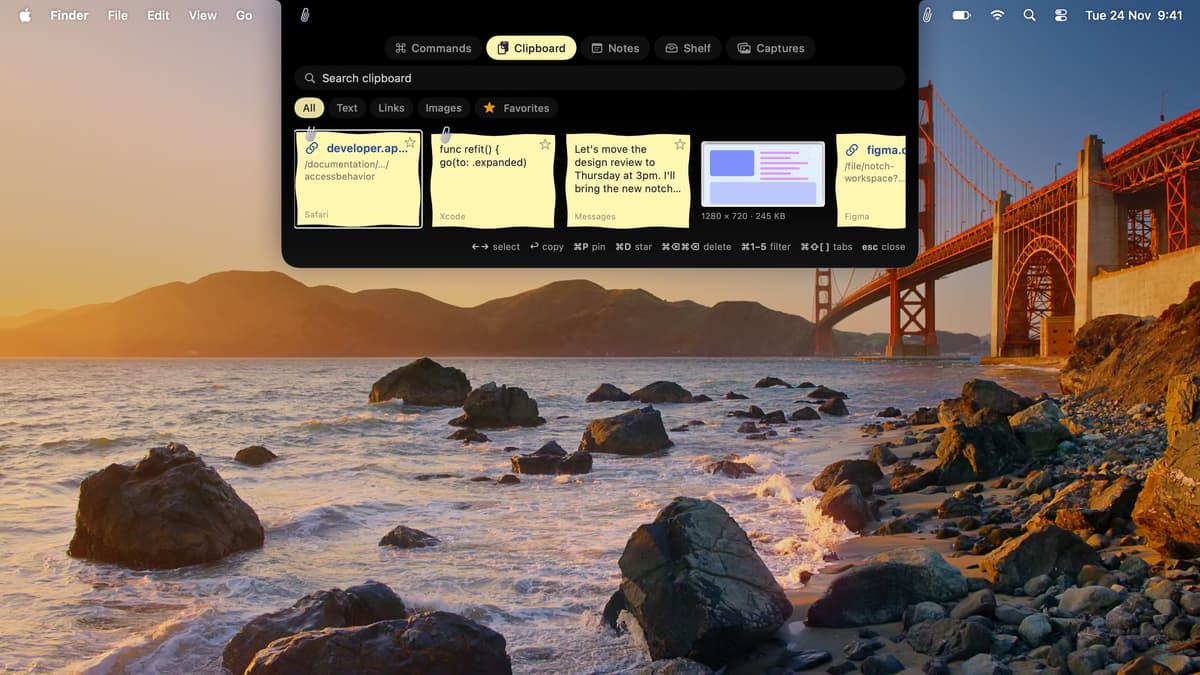
The notch on modern MacBooks is mostly dead space. At the same time, many Mac users juggle a clipboard manager, a screenshot tool, a notes app and a place to park files, each with its own window, menu bar icon and shortcut.
NotchClippy brings those everyday tools together in one place: the notch. It is a Mac notch clipboard manager with screenshot annotation, quick notes, a file shelf and a few handy extras, run by a small animated paperclip called Clippy. You can explore NotchClippy on its official website and try every feature free for seven days.
This review covers what NotchClippy includes, how it works, how pricing works and who it suits.
What Is NotchClippy?
NotchClippy is a native macOS app that turns your Mac's notch into a productivity toolkit. You hover the notch to peek, click to open it, or summon each tool with a keyboard shortcut. It is listed on CodeHype as NotchClippy in the productivity category.
It is local-first: according to the developer, nothing you copy, capture or write ever leaves your Mac. There is no account and no analytics, and the app only goes online to check your licence and, if you allow it, to look for updates. NotchClippy requires macOS 15 or later.
Key Features
Clipboard History
NotchClippy keeps a searchable history of text, links and images you copy. You can pin items you reuse, star favourites and paste straight back into the app you were using. The shortcut is Control-Shift-V.
Screenshots With Quick Annotation
Select an area of the screen and annotate it in place with boxes, arrows, a pen, text, highlights, redaction and cropping. You can then copy the result, save it or copy just the text from it. Screenshots use Control-Shift-S, and a separate Copy Text tool uses Control-Shift-T.
Quick Notes
A scratchpad is always one shortcut away (Control-Shift-N). Notes save as you type and stay on your Mac.
File Shelf
Park up to 50 files and folders by the notch and drag them out when you need them (Control-Shift-F).
Extra Tools
- Timer: pick 5 to 60 minutes and the countdown runs in the notch (Control-Shift-M)
- Colour picker: click any pixel to copy its hex code; hex codes in your clipboard and notes show their colour (Control-Shift-P)
- Keep awake: stop your Mac from sleeping during a long download or a presentation (Control-Shift-K)
Every tool has a shortcut, and you can record your own.
A Notch on Every Screen
External displays get a virtual notch of the same size, working the same way. Shortcuts open on the display your pointer is on, with one shared workspace across displays.
Native and Light
NotchClippy is built with Apple's own frameworks, lives in the menu bar as a paperclip with no Dock icon, redraws nothing when idle, steps aside in full screen and respects the Reduce Motion setting.
Clippy's Personality
Clippy sleeps behind the notch, tumbles out when you call him and goes back to bed when you are done. You can pick him up and drop him, and he remembers his spot. It is a playful touch that sets NotchClippy apart from purely utilitarian tools.
How NotchClippy Works
- Install the app: download NotchClippy for macOS 15 or later.
- Open it from the notch: hover to peek or click to open, or use a shortcut.
- Copy, capture and jot as usual: your clipboard history, screenshots, notes and files collect in one place.
- Pull things back out: search the clipboard, drag files from the shelf or paste an annotated screenshot.
Use Cases
Developers
Paste a code snippet you copied an hour ago without searching through files or browser tabs.
Designers
Grab a region of the screen, draw an arrow at the bug, and paste the annotated screenshot into a ticket.
Writers and Everyday Users
Keep quick notes and frequently used text a shortcut away, and park the files you are working with by the notch.
NotchClippy Pricing
NotchClippy uses a one-time licence instead of a subscription:
| Option | Price | Details |
|---|---|---|
| Free trial | $0 | 7 days with every feature, no account or card, works offline |
| Lifetime licence | $9 launch offer (regular price $12) | One payment covers 2 Macs for life |
Your clips and notes stay yours after the trial ends. The launch price was listed on the NotchClippy website at the time of writing and may change.
Who Should Use NotchClippy?
- Mac users with a notch who want to make that space useful
- Developers and designers who rely on clipboard history and annotated screenshots
- Privacy-conscious users who prefer local-first tools without accounts or analytics
- Anyone tired of subscriptions for small utilities
Advantages and Limitations
Advantages
- Clipboard history, screenshots, notes and a file shelf in one app
- Keyboard shortcuts for every tool, with custom shortcuts
- Local-first, with no account and no analytics
- Works on external displays with a virtual notch
- One-time licence for two Macs, plus a 7-day free trial
Limitations
- Requires macOS 15 or later
- macOS only, with no Windows or iOS version mentioned
- Users who prefer a strictly minimal interface may not want the animated assistant
Final Verdict
NotchClippy turns an otherwise wasted part of the screen into a practical everyday toolkit. Clipboard history, annotated screenshots, quick notes and a file shelf cover a lot of daily Mac work, and the local-first design, keyboard-driven workflow and one-time price make it easy to recommend for anyone who lives on their Mac.
If you use several small utilities today, the 7-day trial is a low-risk way to see whether one notch can replace them. Visit the official NotchClippy website to download the trial, or explore more productivity tools on CodeHype.
Frequently Asked Questions
What does NotchClippy do?
It puts clipboard history, screenshot annotation, quick notes, a file shelf and extra tools like a timer, colour picker and keep-awake switch into your Mac's notch.
Is NotchClippy a subscription?
No. It is a one-time lifetime licence, currently a $9 launch offer (regular price $12), covering two Macs.
Is there a free trial?
Yes. You can try every feature free for seven days, with no account or card required.
Does NotchClippy send my data anywhere?
According to the developer, nothing you copy, capture or write leaves your Mac. The app only goes online to check your licence and, if allowed, for updates.
Does it work on Macs without a notch or on external displays?
External displays get a virtual notch that works the same way, and shortcuts open on the display your pointer is on. NotchClippy requires macOS 15 or later.