Productivity
Easy Vault Review: An Encrypted Photo Vault App for iPhone
Easy Vault is an iPhone and iPad photo vault that encrypts private photos, videos and documents on your device, with no account, ads or tracking.
CodeHype8 min read
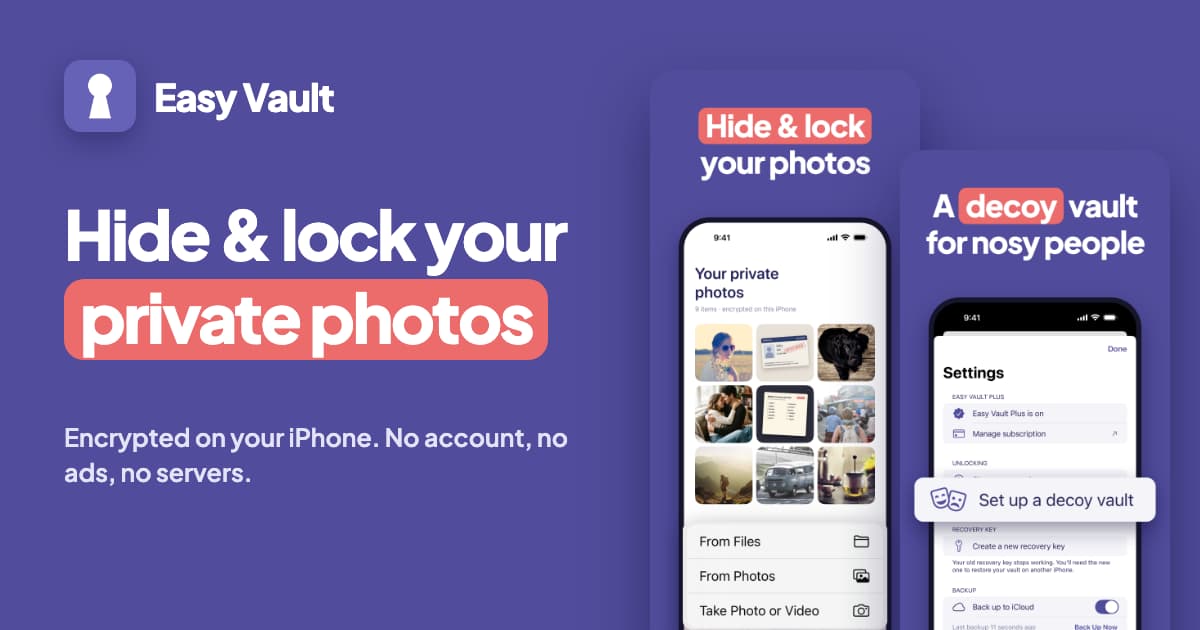
Your camera roll holds more than holiday photos. Screenshots of passports, insurance cards, medical letters and even recovery phrases for crypto wallets often sit right next to everyday pictures. Hand your phone to someone to show one photo, and everything else is a swipe away.
Easy Vault is a photo vault app for iPhone that moves those files out of your camera roll and into an encrypted vault that only you can open. It works without an account, shows no ads and includes no tracking. You can read more about Easy Vault on its official website and download it from the App Store.
This review covers how Easy Vault protects your files, what makes it different from other vault apps, how pricing works and who it is best suited for.
What Is Easy Vault?
Easy Vault is a privacy app for iPhone and iPad that stores private photos, videos and documents in an encrypted vault on your device. It is listed on CodeHype as Easy Vault in the mobile apps category.
The core idea is that many vault apps only hide photos, while Easy Vault encrypts every file the moment it arrives. Without your pattern, password or Face ID, the files are unreadable, including to the developers.
Key Features
Real Encryption, Not Just Hiding
Every photo, video and file is encrypted on your iPhone before it is saved. This differs from the built-in Hidden album, which anyone who knows your phone's passcode can open and which stores photos like any other. Easy Vault has its own lock in addition to your phone passcode.
No Account, No Ads, No Tracking
There is no sign-up and no email address. Easy Vault says your files never leave your phone because it has no servers to send them to, and the app contains no ad, analytics or tracking code. As a result the download is small, about 5 MB according to the developers.
Your Photos Are Never Trapped in the App
This is Easy Vault's main differentiator. Many vault apps store photos in a format only their own app can read, so a broken update, a removed app or a phone switch can leave your photos stuck. Easy Vault handles this with an encrypted export:
- Tap Export encrypted vault in Settings to create one locked file with everything inside.
- Keep that file anywhere, such as your computer, a USB drive or Google Drive. Without your recovery key, the file is unreadable.
- Open it on any computer at easyvault.app/open with your recovery key. It runs in the browser, needs no app or account and uploads nothing.
Open-Source Encryption Code
The part of the app that locks your photos is public, so security experts can check how it works. Easy Vault publishes this core under the Apache 2.0 license.
Add Files From Anywhere
You can add files from Photos or Files, from the share sheet in any app (for example WhatsApp), or with Easy Vault's own camera. Photos and videos taken with the built-in camera go straight into the vault and are never saved to your camera roll. After importing, Easy Vault can remove the originals from Photos and shows you how to empty Recently Deleted.
Protection Against Guessing
After a few wrong attempts, the wait before the next try gets longer. With Easy Vault Plus you can also turn on intruder photos: after two wrong passcodes in a row, the front camera takes a picture, which you see the next time you unlock.
Optional Encrypted iCloud Backup
If you turn on iCloud backup, an encrypted copy of your vault is kept in your iCloud. After reinstalling the app, you can restore it with your recovery key.
How to Set Up Easy Vault
- Choose your lock: draw a pattern or pick a password. Face ID can handle everyday unlocking.
- Save your recovery key: you receive it during setup. It is the only way back into your vault if you forget your lock, because nobody else holds a copy.
- Add your files: import from Photos, Files, the share sheet or the in-app camera.
- Clear the originals: let Easy Vault remove the copies from Photos.
The developers describe the setup as taking about a minute.
What You Can Keep in Easy Vault
- Private photos and videos you do not want visible when someone borrows your phone
- ID documents such as passports, driving licences and insurance cards, ready when a hotel or doctor asks
- Recovery phrases and codes, the kind of screenshots that scam apps look for
- Letters and records, such as medical results or bank letters
Pricing
Easy Vault is free for up to 100 photos and videos. Easy Vault Plus unlocks additional features, including intruder photos. The current price of Plus is shown in the App Store; it was not listed on the Easy Vault website at the time of writing, so check the App Store listing for current pricing.
Who Should Use Easy Vault?
Easy Vault suits iPhone and iPad users who want stronger privacy than the Hidden album offers, without creating an account or trusting a cloud service with their files. It is particularly relevant for:
- People who often share their screen or hand their phone to others
- Travellers who want ID documents ready but out of the camera roll
- Crypto users who need to keep recovery phrases away from screenshot-scanning apps
- Anyone who values open, verifiable encryption over closed-source promises
Advantages and Limitations
Advantages
- Files are encrypted on the device, not just hidden
- No account, ads or tracking, and a small app size
- Exported vaults can be opened without the app, using only the recovery key
- Open-source encryption core that experts can review
- Built-in camera that bypasses the camera roll
Limitations
- Available only for iPhone and iPad; there is no Android version
- If you lose your recovery key and forget your lock, nobody can recover your vault, by design
- Deleting the app deletes the vault on the phone, so you should enable backup or export first
- The free tier is limited to 100 photos and videos
Final Verdict
Easy Vault takes a sensible, transparent approach to photo privacy on iPhone. Real on-device encryption, no accounts, no tracking and a published encryption core address the main weaknesses of many vault apps, and the ability to open an exported vault without the app removes the fear of being locked in.
If you keep sensitive photos or documents on your iPhone, the free tier is enough to try it with your most important files. Visit the official Easy Vault website to learn more and download the app, or explore other mobile apps on CodeHype.
Frequently Asked Questions
Does Easy Vault encrypt my photos or just hide them?
It encrypts them. Every file is encrypted on your iPhone before it is saved and cannot be read without your pattern, password or Face ID.
What happens to my photos if Easy Vault shuts down?
You can export your vault from Settings and open it on any computer at easyvault.app/open with your recovery key, without the app.
What if I forget my password?
Use the recovery key you received during setup. It is the only way back in, because the developers do not hold a copy.
Do I need an account?
No. There is no sign-up and no email address, and your files stay on your phone.
Is Easy Vault available on Android?
No. Easy Vault is only available for iPhone and iPad.
Is Easy Vault free?
Yes, for up to 100 photos and videos. Easy Vault Plus adds features such as intruder photos; check the App Store for its current price.