Productivity
Logfolio Review: One Page to Track the Books, Films, TV Shows, Games and Music You Love
Logfolio review: log books, films, TV, games and albums on one public page, import from Goodreads and Letterboxd, and see what's free and what Pro adds.
CodeHype9 min read
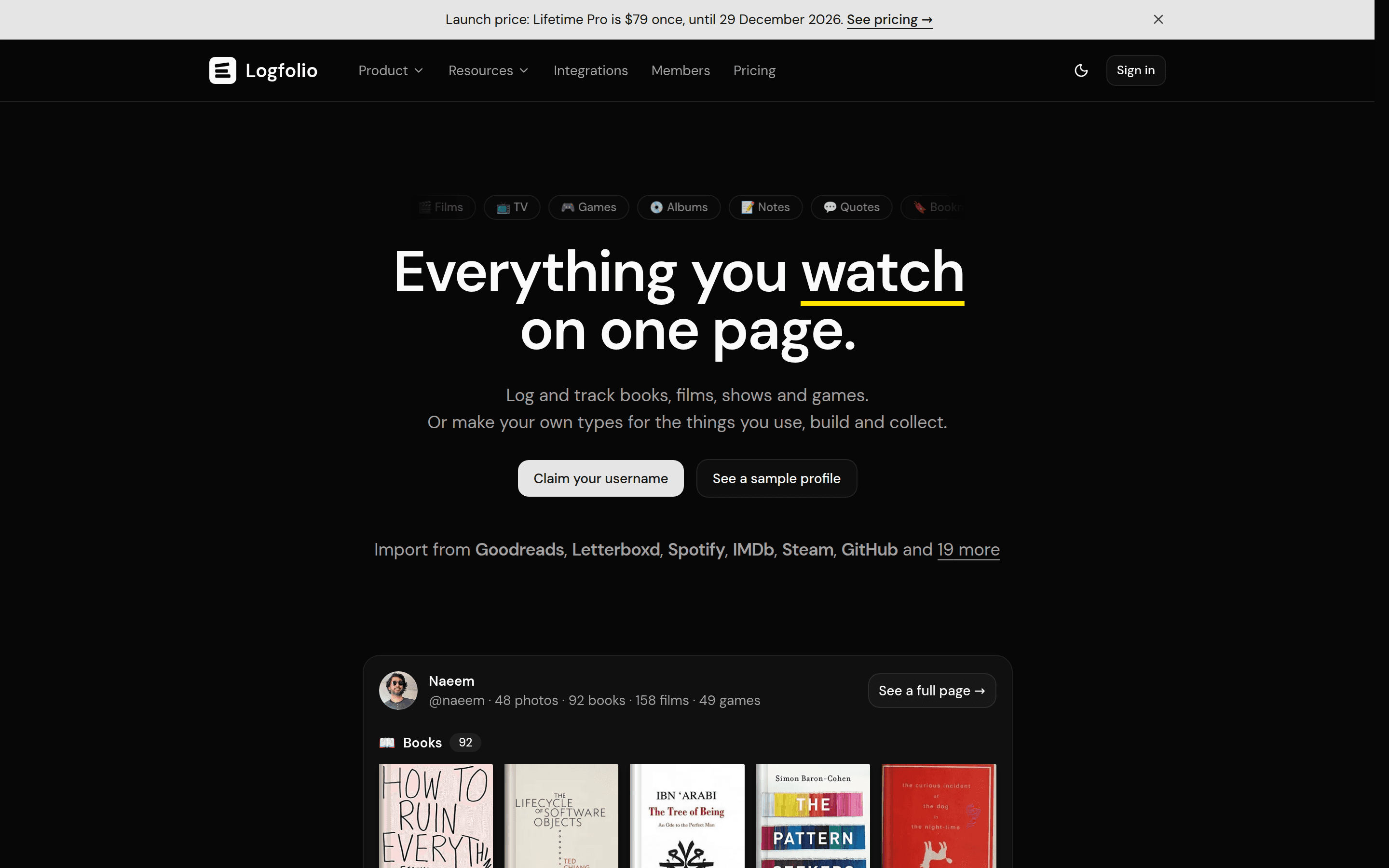
If you track what you read, watch and play, your history is probably scattered. Books live on Goodreads or StoryGraph, films on Letterboxd, TV shows on Trakt, games in a spreadsheet and albums somewhere else entirely. Each app shows one slice of your taste, and none of them shows the whole picture.
Logfolio puts it all on one page. You can log books, films, TV shows, games, albums and more with a rating, a date and a review, bring your history over from the apps you already use, and share everything on a public profile. The basics are free with no limit on entries. You can try it on Logfolio's official website.
This review covers what Logfolio tracks, how importing works, what the free plan includes, what Pro adds and who it's best for.
What Is Logfolio?
Logfolio is a web-based media tracker and personal log. Its idea is simple: everything you read, watch, play, collect and build belongs on one page. Each user gets a profile at logfolio.co/yourname that shows their books, films, shows, games and music side by side.
For many people it works as a Goodreads and Letterboxd alternative in one place. Instead of keeping separate accounts for each type of media, you keep one log and one public page.
Logfolio is made by Naeem Noor, an indie maker and frontend developer based in Bahrain. It grew out of a media log he kept on his own website. You can find it on CodeHype in the Entertainment category and on the Logfolio product listing.
What You Can Track With Logfolio
On the free plan, Logfolio has nine built-in types, all unlimited:
- Books
- Manga
- Films
- TV shows
- Anime
- Games
- Albums
- Songs
- Podcasts
With Pro, you can also create your own types for anything else you use, build or collect, such as gear, projects, places, recipes or LEGO sets. Custom types can have up to 12 fields.
Key Features of Logfolio
Ratings, Reviews and a Diary
Every entry has a status, such as Want to read, Reading, Read or Dropped, plus a rating from half a star to five stars, tags and an optional review. Dates can be a full day, a month or just a year, which helps when you're logging things you finished long ago and only roughly remember when.
When you add a title, search fills in the cover, creator and year for you. Each type also has a diary, so you can see what you finished and when.
One Public Profile
Your page brings together everything you've logged. You can choose up to five featured entries for each type, create unlimited lists that can be ranked, mix different types and carry a note on each item.
To share your log, there are link previews, share buttons for X, LinkedIn and WhatsApp, RSS feeds and an embeddable profile card you can place on your own website.
Imports From the Apps You Already Use
Logfolio is built so you don't have to start over. On the free plan you can import from:
- Books: Goodreads, StoryGraph, Hardcover and LibraryThing
- Films and TV: Letterboxd, IMDb, Netflix, Trakt and TV Time
- Music: Spotify, Apple Music, YouTube Music, Discogs and Rate Your Music
- Anime and manga: MyAnimeList
- Podcasts: podcast apps, through an OPML file
You can also import any spreadsheet as a CSV and map its columns, or paste a list of titles. Pro adds more sources, including Steam, GitHub, ListenBrainz, Kindle highlights, Pocket, browser bookmarks, Obsidian and several LEGO databases.
File imports are one-time. Re-importing skips duplicates and keeps the edits you've made, the uploaded file is discarded after the import, and Logfolio never signs in to the other app. Steam, GitHub and ListenBrainz are syncs rather than one-time imports: GitHub and ListenBrainz sync daily, and Steam syncs when you press Sync now.
Episode Tracking and Reading Goals
For TV and anime, you can tick off episodes and see what's up next. Readers can set a reading goal, and Pro adds a reading pace.
Browser Extension
The Logfolio browser extension works in Chrome (including Brave and Arc), Edge and Firefox. It lets you log a title in two clicks straight from IMDb, Letterboxd, Goodreads, Steam and Spotify pages.
Full Export
Your log belongs to you. On any plan you can export everything as a ZIP of CSV files from your settings.
What Logfolio Pro Adds
Pro is for people who want to go deeper than ratings and reviews. It adds:
- Stats and a year in review
- Notes that can be private or published and that link to entries in your log, so an entry shows where it was mentioned
- Quotes from your books, including Kindle highlights
- Bookmarks, including Pocket and browser bookmarks
- Photos, up to 500 images
- Your own types for gear, projects, places and collections
- Private entries and a private profile
- Themes, accents and a cover picture
- A custom domain with your own menu
- Steam, GitHub and ListenBrainz sync
- Control over which sections your page shows and in what order
- No ads
How Logfolio Works
Getting started is quick:
- Sign up with Google or email. Email sign-in uses a link, so there is no password to remember.
- Choose a username. It becomes your page address, logfolio.co/yourname.
- Add a photo, name, bio and location if you want to.
- Import your history or search for titles and add them.
- Your page goes live, and you keep logging from there. Pressing N anywhere opens quick-add.
Logfolio runs in the browser on both phones and computers, so there is nothing to install. There is no native iOS or Android app, but adding an entry on a phone opens as a sheet from the bottom of the screen.
Use Cases
Readers Leaving Goodreads or StoryGraph
Import your reading history, keep your ratings and reviews, set a reading goal and add films and shows to the same page.
Film and TV Fans
Bring your Letterboxd, IMDb or Trakt history over, keep a diary of what you watch and tick off episodes as you go.
Gamers Tracking a Backlog
Log games with a status and rating, keep a backlog list and, on Pro, sync your library from Steam.
Collectors and Makers
With Pro's custom types, you can log a record collection, LEGO builds, gear, side projects or places you've visited, and link notes to them. If you also like structured self-tracking, our review of Think in Numbers covers a journaling and time-tracking app.
Logfolio Pricing
Logfolio has a free plan and two ways to pay for Pro. Prices are in US dollars.
| Plan | Price | What you get |
|---|---|---|
| Free | $0, no card needed | Unlimited books, manga, films, TV, anime, games, albums, songs and podcasts, with ratings, reviews, lists, a public page, imports and full export |
| Pro | $19 per year | Everything in Free, plus stats, notes, quotes, custom types, private entries, themes, a custom domain, more imports and syncs, and no ads |
| Lifetime | $79 once (launch price until December 29, 2026), then $99 | Everything in Pro with no renewals, including features Pro adds later |
A few more details from the pricing page:
- Payments go through Polar.
- You can cancel any time, and Pro stays active until the end of the period you've paid for.
- Refunds are available within 14 days of a payment.
- If you stop paying, nothing is deleted. Pro items become read-only and leave your public page.
Who Should Use Logfolio?
Logfolio is a strong fit for:
- People who track several kinds of media and want them in one place.
- Goodreads, Letterboxd, StoryGraph or Trakt users who want to move their history rather than start again.
- Anyone who wants a shareable page that shows their taste across books, films, games and music.
- Collectors and makers who want custom types for things beyond media (on Pro).
Advantages and Limitations
Advantages
- One page for many types of media, with nine built-in types free and unlimited.
- Imports from the major tracking apps, plus CSV and pasted lists, with duplicates skipped on re-import.
- Generous free plan with lists, a public page, imports and full export.
- Low-cost Pro at $19 a year, or a lifetime option.
- You own your data: export everything at any time, and nothing is deleted if you stop paying.
Limitations
- No native mobile app. It runs in the mobile browser instead.
- File imports don't keep syncing. Only Steam, GitHub and ListenBrainz sync, and those are Pro features.
- Some features are Pro only, including custom types, notes, quotes, bookmarks, photos, stats and private entries.
- Free accounts may see small ads for the maker's own products.
- You must be 16 or older to use it.
Final Verdict: Is Logfolio Worth Using?
Logfolio solves a real annoyance for anyone whose reading, watching and playing history is spread across several apps. The free plan is useful on its own: unlimited entries across nine media types, imports from Goodreads, Letterboxd and many other services, a public profile and full export. Pro adds depth at a modest price, and the lifetime option suits people who prefer not to subscribe.
If you've wanted one page that shows everything you're into, Logfolio is easy to try. Import your history and see how it looks. Visit the official Logfolio website to claim your username.
Frequently Asked Questions
Is Logfolio free?
Yes. The free plan has no limit on books, manga, films, TV, anime, games, albums, songs and podcasts, and includes ratings, reviews, lists, a public page, imports and export. Pro costs $19 a year.
Can I import my Goodreads and Letterboxd history into Logfolio?
Yes. Logfolio imports from Goodreads and Letterboxd on the free plan, along with StoryGraph, Hardcover, LibraryThing, IMDb, Trakt, Spotify and other services. You can also import a CSV or paste a list of titles.
Is there a Logfolio app for iPhone or Android?
There is no native app. Logfolio runs in your phone's browser, and adding an entry on mobile opens as a bottom sheet. Browser extensions are available for Chrome, Edge and Firefox.
Can I export my data from Logfolio?
Yes. On any plan you can export your whole log as a ZIP of CSV files from your settings.
What does Logfolio Pro add?
Pro adds stats and a year in review, linked notes, quotes and Kindle highlights, custom types, private entries, themes, a custom domain, Steam, GitHub and ListenBrainz sync, and removes ads.
What happens to my log if I stop paying for Pro?
Nothing is deleted. Your Pro items become read-only and are hidden from your public page, while your free features keep working.